
SIP 전화 및 도어 인터콤 구성 및 응용 프로그램
Table of contents

소개

개요

도어 인터콤 시스템은 양방향 통신 시스템으로, 사용자가 내장 카메라를 통해 문 잠금/잠금 해제를 제어하고 주변 환경을 모니터링할 수 있습니다. 실내 인터콤(IP 전화기)과 옥외 인터콤(도어 스테이션) 두 가지 장치로 구성됩니다.

인터콤 시리즈는 옥외 스테이션으로 사용되며, 전화기 시리즈는 실내 스테이션으로 작동합니다. 두 제품 모두 IP/SIP 음성 및 영상 통화를 지원하며 연동하여 문 제어 및 모니터링 기능을 구현합니다. 동일한 LAN 내에서 한 기기는 IP 또는 SIP 방식으로 다수의 기기와 통신(일대다 또는 다대다)할 수 있습니다.

본 문서는 Bi31s (인터콤 시리즈)BF600S (안드로이드 실내 전화기)를 예시로 사용합니다.

적용 모델

본 문서는 실내 IP 전화기 시리즈 및 인터콤 도어 스테이션 시리즈에 적용됩니다.

대상 사용자

본 안내서는 도어 인터콤 시스템과 연동되는 SIP 전화기의 기본 설정 및 활용 방법을 익히고자 하는 사용자를 대상으로 합니다.

용어 설명

SIP: 등록된 SIP 계정을 이용해 실시간 통신을 구현하는 서버.
DTMF: 원격 기기 제어용 명령 코드를 전송하는 신호 방식.
오디오 코덱: 안정적인 음성 전송을 보장하는 오디오 인코딩 형식.
비디오 코덱: 정상적인 영상 화면 전송을 보장하는 비디오 인코딩 형식.

설정 안내

실내 전화기 기본 설정 (BF600S)

BF600S는 직관적인 UI와 간편한 조작이 특징인 안드로이드 영상 전화기입니다. 동일한 SIP 서버에 등록하여 도어 스테이션과 통신할 수 있으며, SIP 서버가 없어도 동일 LAN 내에서 IP 기반 피어투피어 음성/영상 통화가 가능합니다.

통신 및 문 제어 기능을 사용하려면 아래 항목을 정확하게 설정해야 합니다:

설정 항목상태설명
SIP 등록등록 완료도어 스테이션과 동일한 SIP 서버에 등록됨
DTMFInband문 잠금 해제 불가 (릴레이 제어에 비활성)
RFC2833문 잠금 해제 정상 지원
Info문 잠금 해제 정상 지원
Auto상대 기기와 DTMF 모드 자동 협상
오디오 코덱전체 활성화호환성 문제 방지
비디오 코덱H.264도어 스테이션의 코덱과 일치해야 함
연락처도어 스테이션 번호 추가특정 도어 스테이션의 수신 전화 식별

참고사항:
1. 정상적인 명령 전송을 위해 SIP 서버는 DTMF 패스스루를 지원해야 합니다.
2. 미디어 전송을 위해 비디오 서버는 H.264를 지원해야 합니다.

3.1.1 SIP 등록

SIP 계정 정보를 입력하고 등록 기능을 활성화합니다. 전화기와 도어 스테이션이 동일한 SIP 서버에 등록되었는지 확인합니다.

웹 경로: VOIP -> SIP -> Basic Settings

설정 예시:
서버: 192.168.3.207, 포트: 5060
사용자 이름: 2006, 비밀번호: ******, 전화 번호: 2006
표시 이름: 2006

Enable(활성화) 항목을 체크하고 Save(저장)를 클릭합니다.
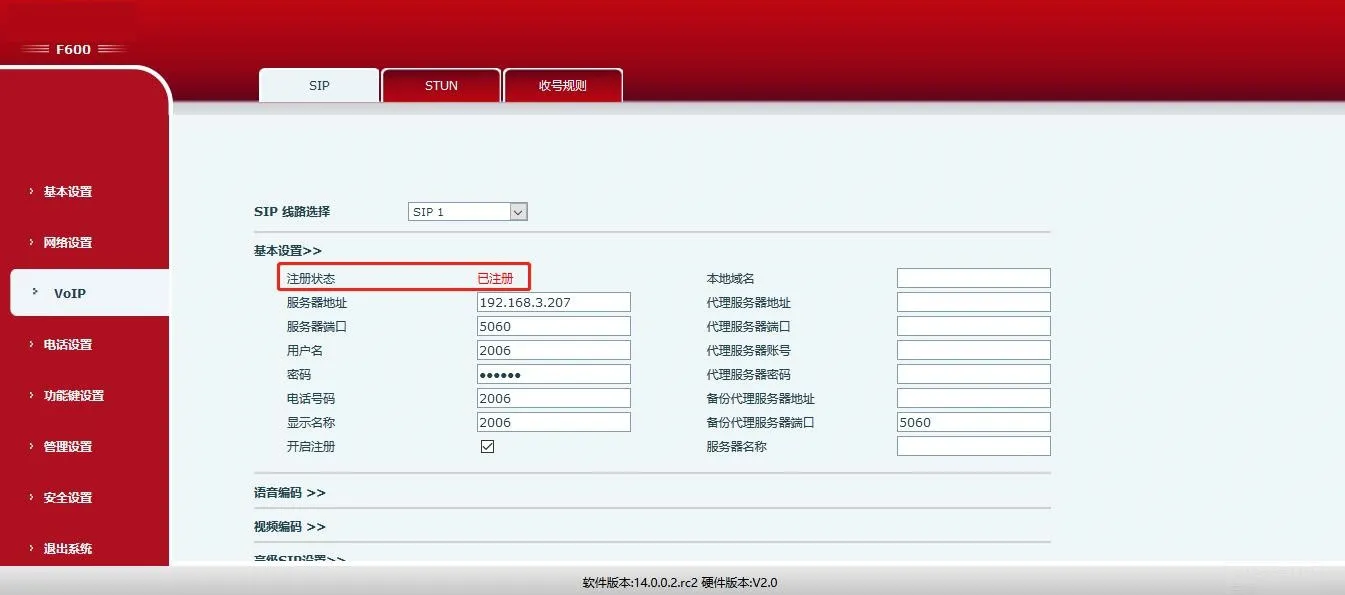
SIP 등록 화면

3.1.2 DTMF 유형

DTMF를 RFC2833 또는 Info로 설정하세요. (INBAND 모드는 문 잠금 해제를 지원하지 않음).

웹 경로: VOIP -> SIP -> Advanced SIP Settings
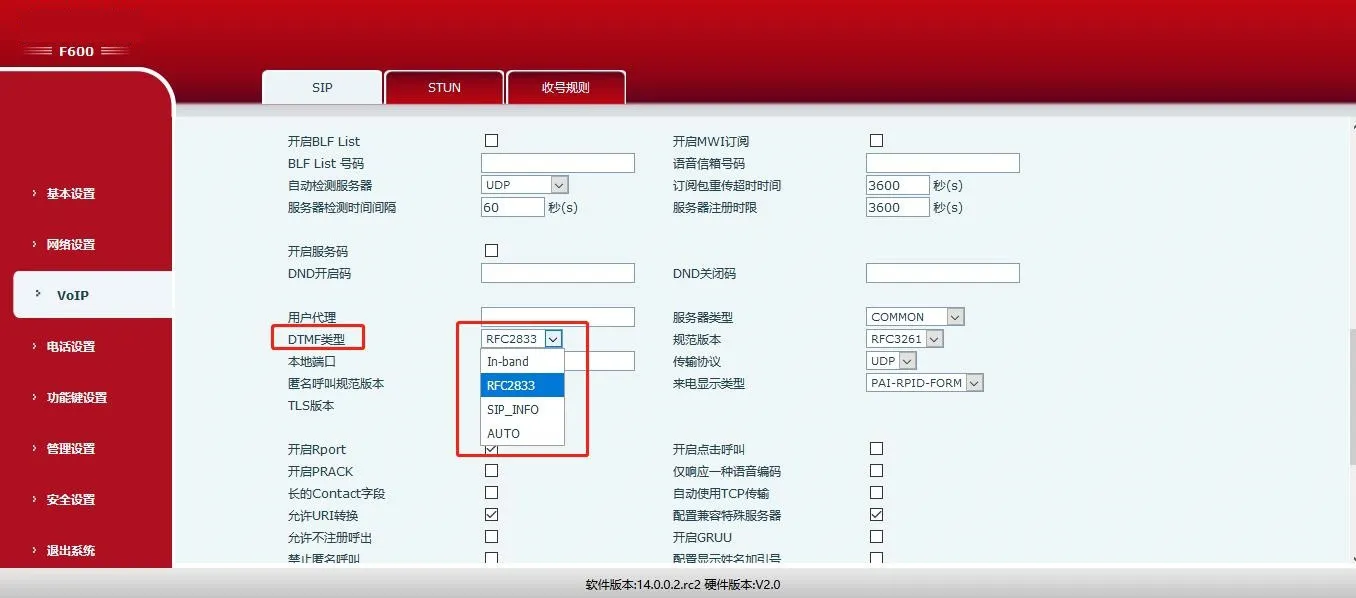
SIP 고급 설정 화면

3.1.3 오디오 코덱

LAN 내 모든 도어 스테이션과의 호환성을 보장하기 위해 모든 오디오 코덱을 활성화하세요.

웹 경로: Phone Settings -> Media -> Audio Settings
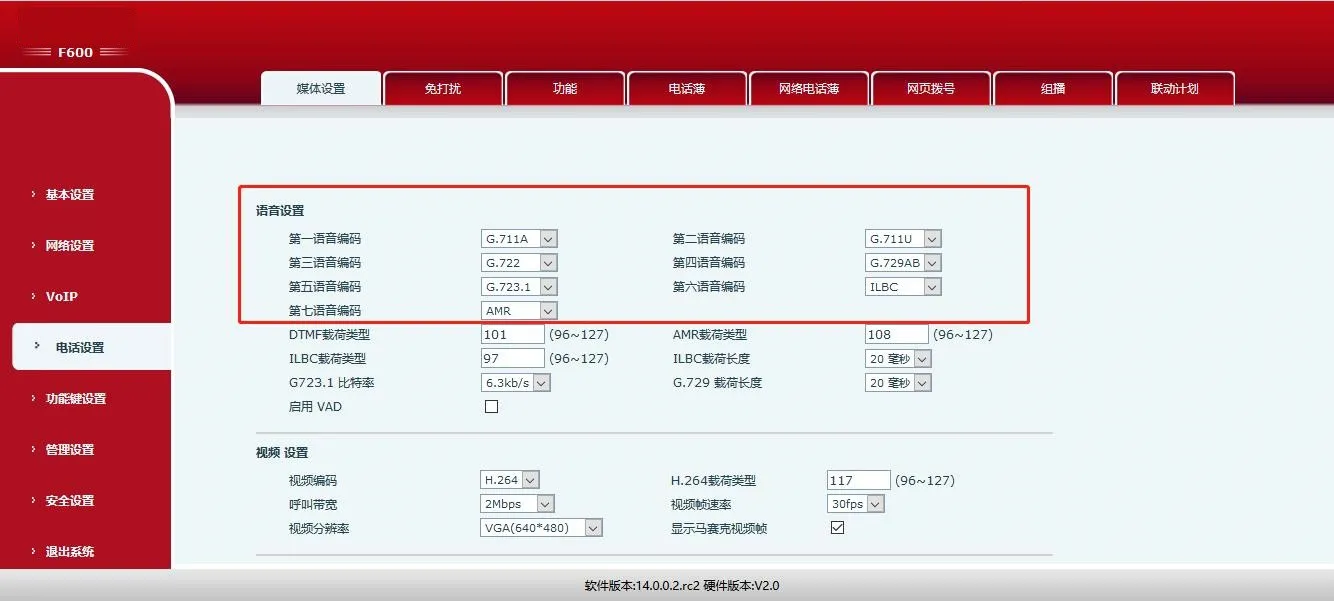
오디오 설정 화면

3.1.4 비디오 코덱

도어 스테이션은 H.264 코덱만 지원합니다. 전화기의 비디오 코덱을 H.264로 설정하세요.

웹 경로: Phone Settings -> Media -> Video Settings

참고: BF600S는 인터콤 및 멀티캐스트 모드도 지원합니다. 자세한 내용은 공식 설명서를 참고하세요.
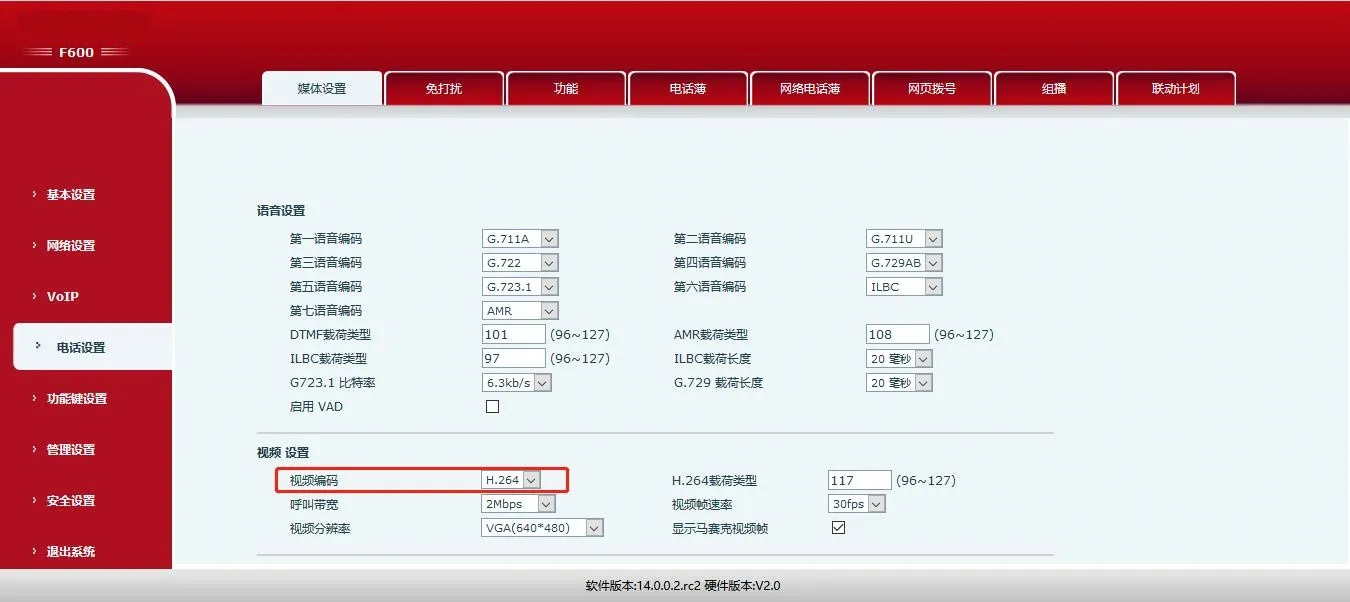
비디오 설정 화면

도어 스테이션 설정 (Bi31s)

Bi31s는 양방향 음성 통화와 단방향 영상 송출을 지원합니다. 방문객이 초인종을 누르면 실내 전화기가 울리며, 사용자는 통화·영상 확인 및 DTMF 코드를 이용해 원격으로 문 잠금 해제를 할 수 있습니다.

Bi31s의 주요 설정 항목은 다음과 같습니다:

설정 항목상태설명
SIP 등록등록 완료실내 전화기와 동일한 SIP 서버에 등록됨
원격 잠금 해제 코드사용자 정의숫자 및 * 기호만 사용 가능
앱 잠금 해제사용자 정의 (기본값 비활성화)전화 발신 시 문 잠금 해제 기능 활성화
원격 접근 목록활성화됨목록에 등록된 번호만 문 잠금 해제 가능
인증 코드 길이사용자 정의잠금 해제 대기 시간 단축
마스터 번호실내 전화기 SIP 번호실내 전화기의 SIP 계정 번호
인증 코드사용자 정의문 잠금 해제용 인증 코드
자동 응답사용자 정의 (기본값 활성화)시간 초과 시 수신 전화 자동 응답

3.2.1 SIP 등록

도어 스테이션을 실내 전화기와 동일한 SIP 서버에 등록합니다.

웹 경로: VOIP -> SIP -> Basic Settings

설정 예시:
서버: 192.168.3.207, 포트: 5060
사용자 이름: 2008, 비밀번호: ******, 전화 번호: 2008

Enable(활성화) 항목을 체크하고 Save(저장)를 클릭합니다.
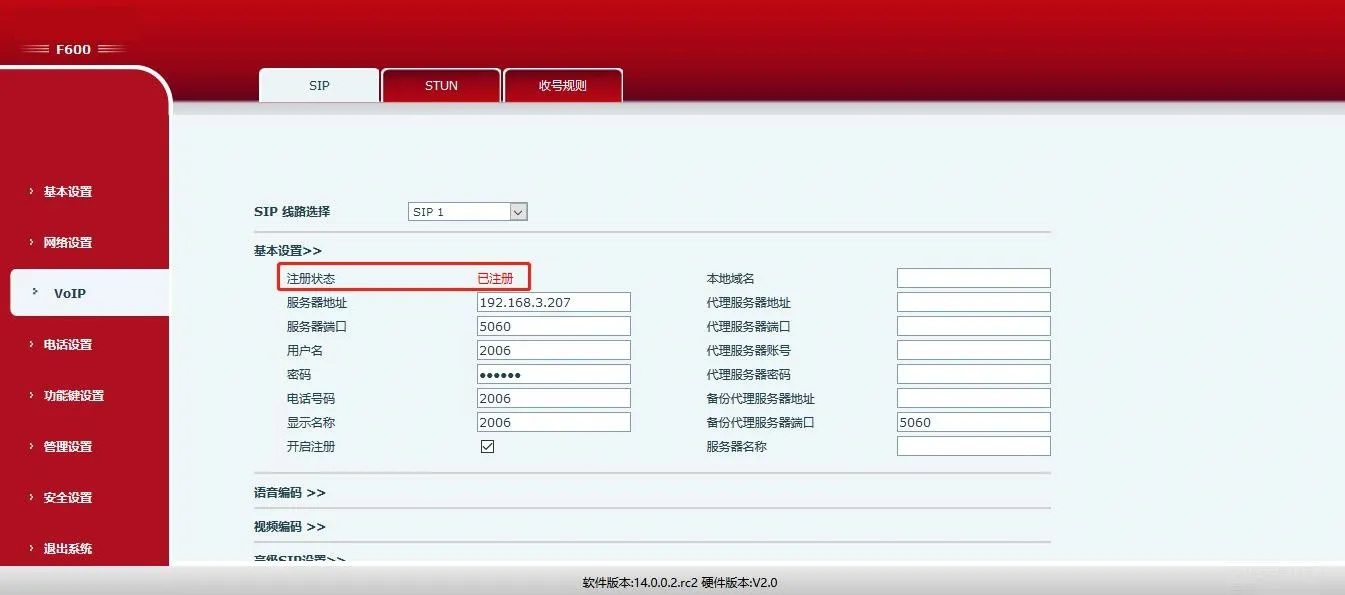
SIP 등록 성공 화면

3.2.2 원격 잠금 해제 코드

잠금 해제 코드를 설정합니다 (기본값: *). 도어 스테이션 전화를 수신한 후 해당 코드를 입력하면 문이 잠금 해제됩니다.

웹 경로: Door Settings -> Features -> General Settings

참고: 숫자 및 * 기호만 입력 가능합니다.
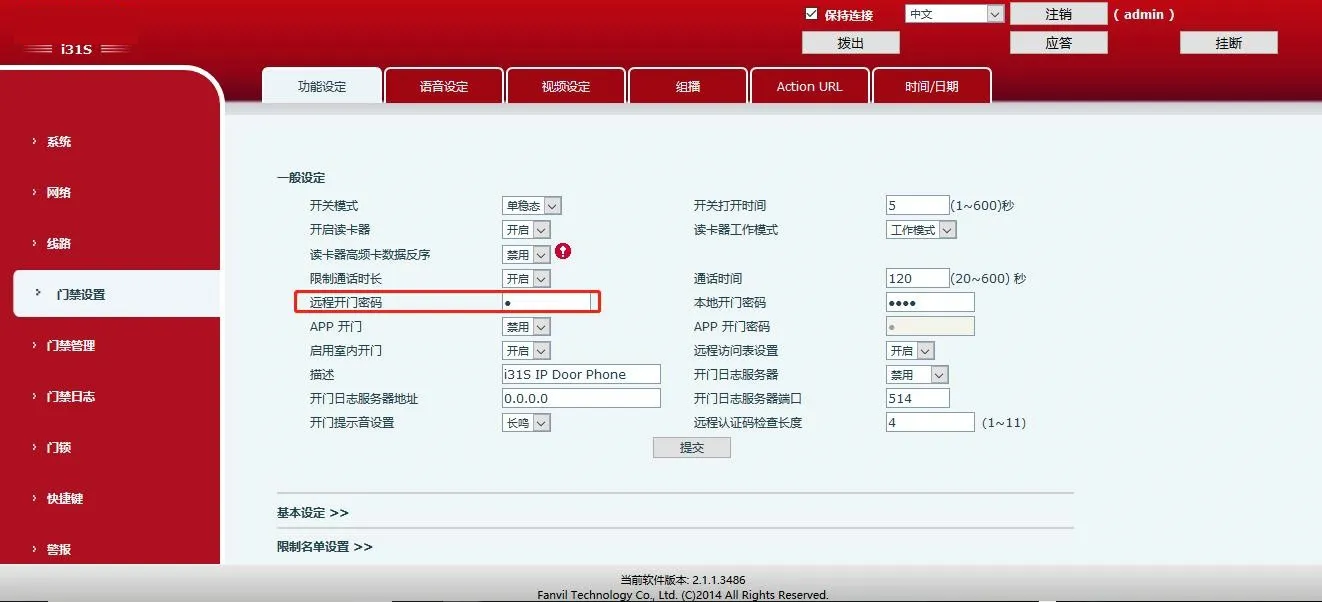
원격 문 잠금 해제 설정 화면

3.2.3 앱 잠금 해제

앱 잠금 해제 기능을 활성화하면 전화기에서 도어 스테이션으로 발신 시 문을 잠금 해제할 수 있습니다.

웹 경로: Door Settings -> Features -> General Settings

참고: 비밀번호는 숫자 및 * 기호만 사용 가능합니다.
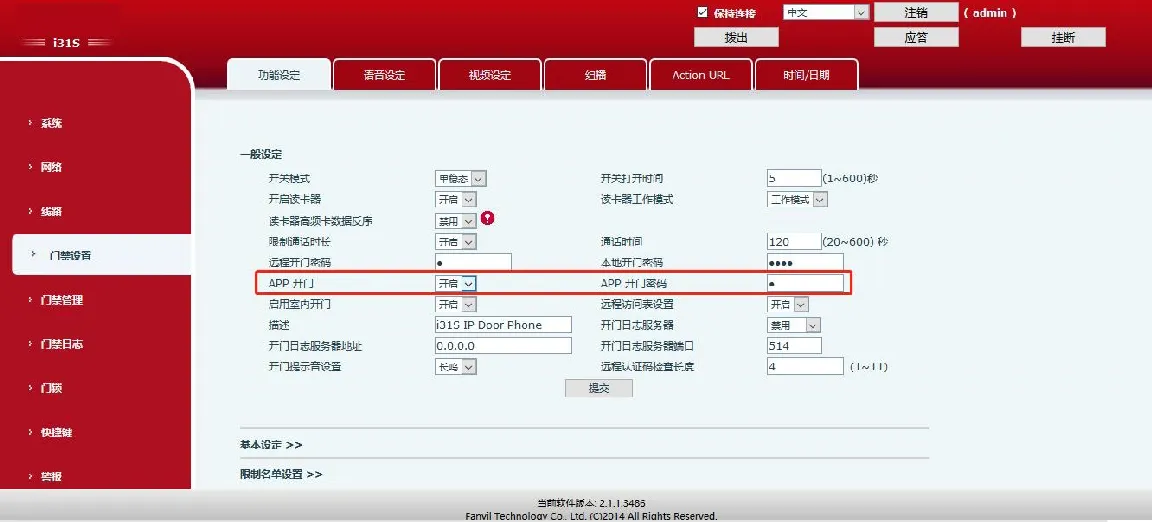
앱 원격 잠금 해제 설정 화면

3.2.4 원격 접근 목록

접근 목록 기능을 활성화합니다 (기본값: 활성화). 목록에 등록된 번호만 문 잠금 해제 권한을 가집니다.

웹 경로: Door Settings -> Features -> General Settings
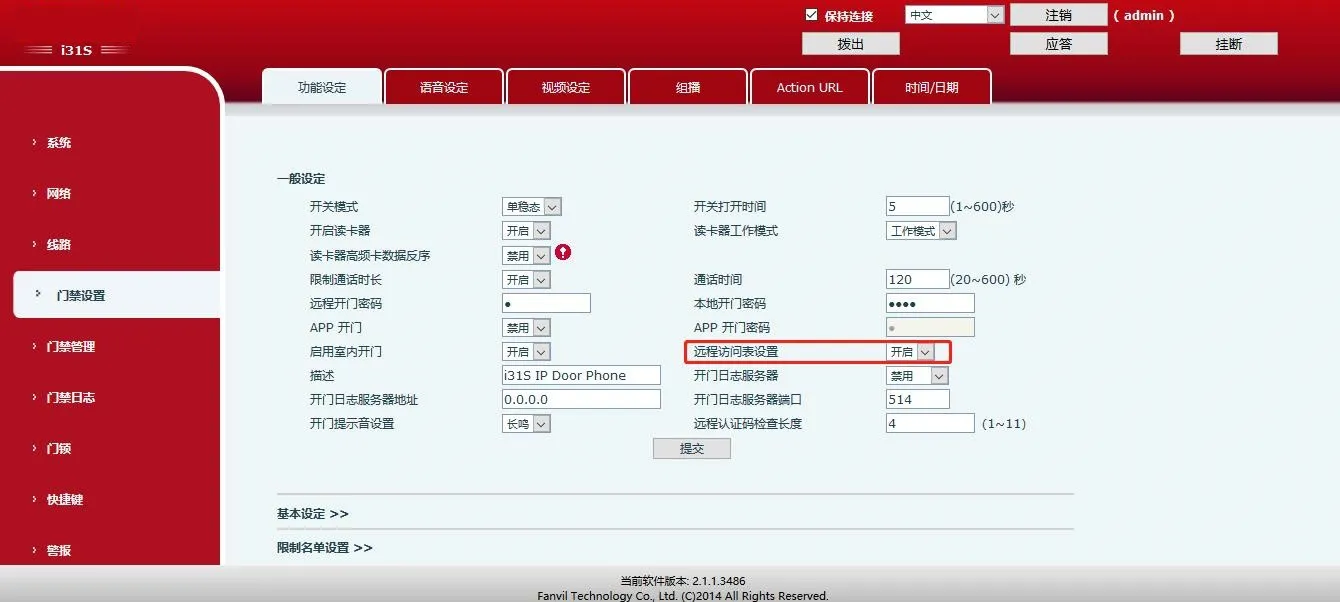
원격 접근 목록 설정 화면

3.2.5 원격 인증 코드 길이

코드 길이를 설정합니다 (1~11자리, 기본값: 4자리). 설정한 자릿수가 채워지면 시스템이 즉시 인증 코드를 전송합니다.

웹 경로: Door Settings -> Features -> General Settings
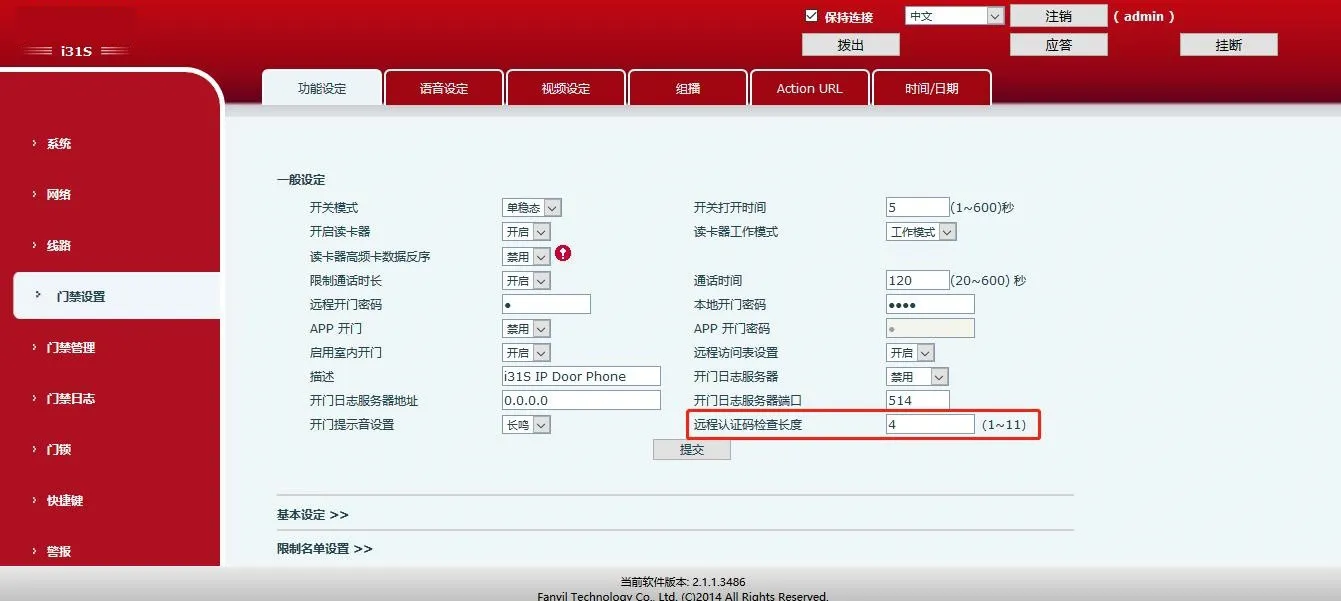
인증 코드 길이 설정 화면

3.2.6 마스터 번호 및 인증 코드

실내 전화기의 SIP 번호를 마스터 번호로 지정하고 잠금 해제용 인증 코드를 설정합니다.

웹 경로: Door Management -> Add Access Rule
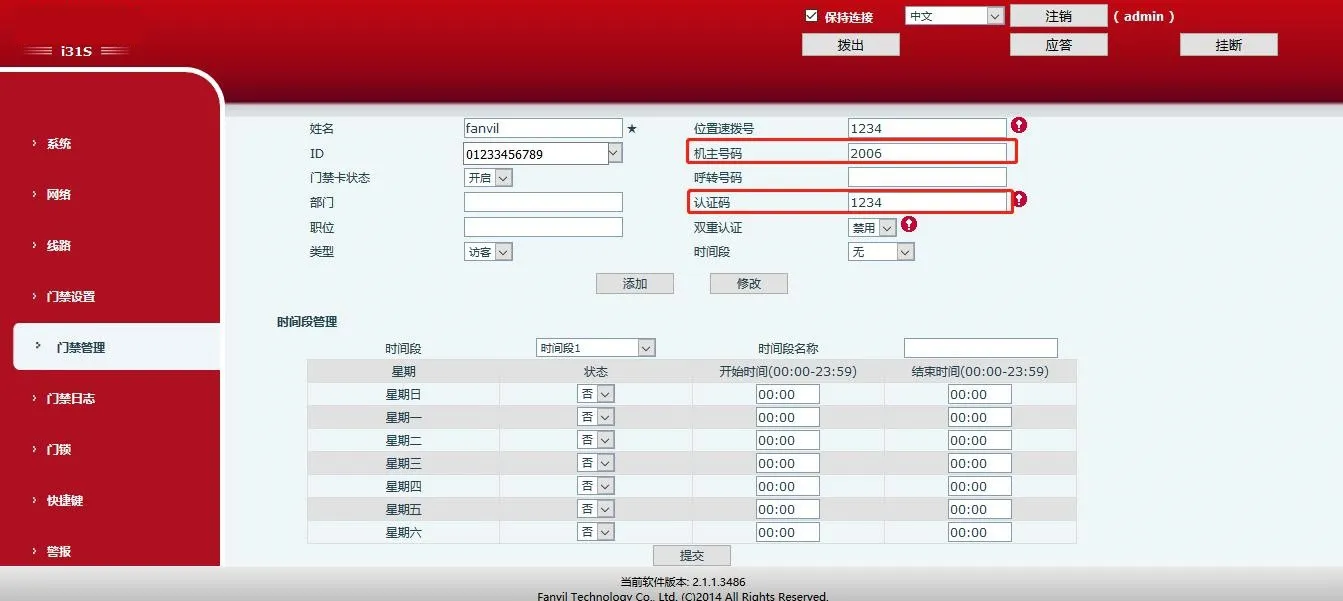
마스터 번호 및 인증 코드 설정 화면

3.2.7 자동 응답

타임아웃 시간을 지정해 자동 응답을 활성화합니다. 도어 스테이션이 실내 전화기의 수신 전화를 자동으로 응답합니다.

웹 경로: Door Settings -> Features -> Basic Settings
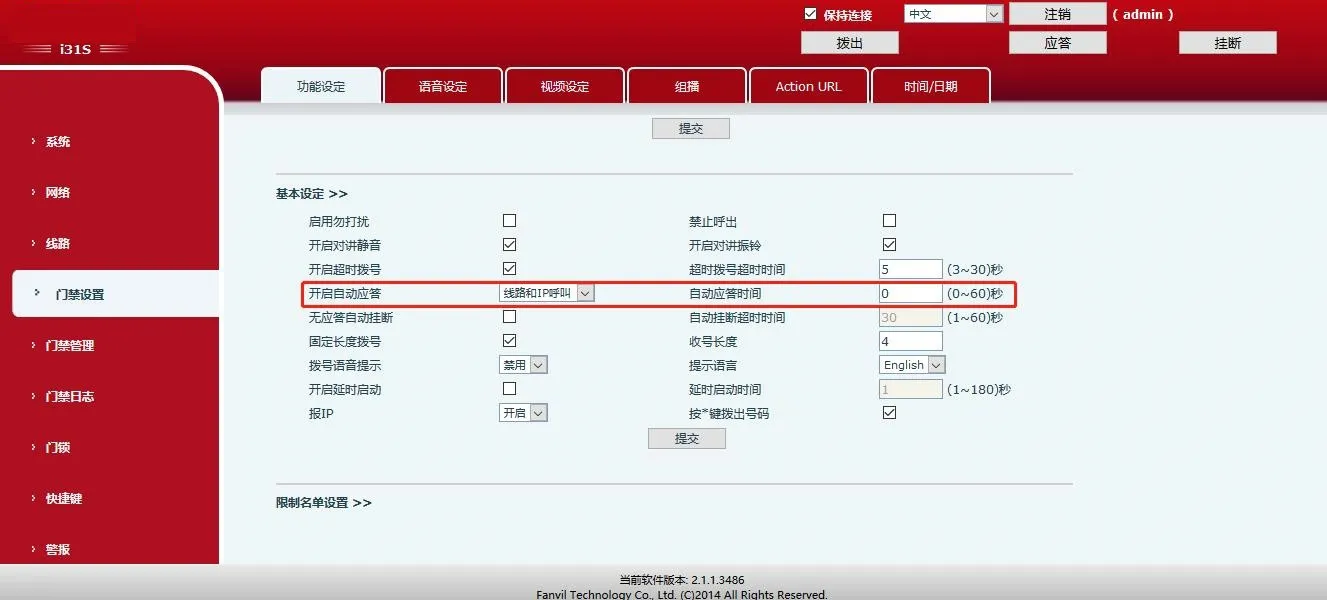
자동 응답 설정 화면

카탈로그
고객 서비스 전화
We use cookie to improve your online experience. By continuing to browse this website, you agree to our use of cookie.

Cookies

This Cookie Policy explains how we use cookies and similar technologies when you access or use our website and related services. Please read this Policy together with our Terms and Conditions and Privacy Policy so that you understand how we collect, use, and protect information.

By continuing to access or use our Services, you acknowledge that cookies and similar technologies may be used as described in this Policy, subject to applicable law and your available choices.

Updates to This Cookie Policy

We may revise this Cookie Policy from time to time to reflect changes in legal requirements, technology, or our business practices. When we make updates, the revised version will be posted on this page and will become effective from the date of publication unless otherwise required by law.

Where required, we will provide additional notice or request your consent before applying material changes that affect your rights or choices.

What Are Cookies?

Cookies are small text files placed on your device when you visit a website or interact with certain online content. They help websites recognize your browser or device, remember your preferences, support essential functionality, and improve the overall user experience.

In this Cookie Policy, the term “cookies” also includes similar technologies such as pixels, tags, web beacons, and other tracking tools that perform comparable functions.

Why We Use Cookies

We use cookies to help our website function properly, remember user preferences, enhance website performance, understand how visitors interact with our pages, and support security, analytics, and marketing activities where permitted by law.

We use cookies to keep our website functional, secure, efficient, and more relevant to your browsing experience.

Categories of Cookies We Use

Strictly Necessary Cookies

These cookies are essential for the operation of the website and cannot be disabled in our systems where they are required to provide the service you request. They are typically set in response to actions such as setting privacy preferences, signing in, or submitting forms.

Without these cookies, certain parts of the website may not function correctly.

Functional Cookies

Functional cookies enable enhanced features and personalization, such as remembering your preferences, language settings, or previously selected options. These cookies may be set by us or by third-party providers whose services are integrated into our website.

If you disable these cookies, some services or features may not work as intended.

Performance and Analytics Cookies

These cookies help us understand how visitors use our website by collecting information such as traffic sources, page visits, navigation behavior, and general interaction patterns. In many cases, this information is aggregated and does not directly identify individual users.

We use this information to improve website performance, usability, and content relevance.

Targeting and Advertising Cookies

These cookies may be placed by our advertising or marketing partners to help deliver more relevant ads and measure the effectiveness of campaigns. They may use information about your browsing activity across different websites and services to build a profile of your interests.

These cookies generally do not store directly identifying personal information, but they may identify your browser or device.

First-Party and Third-Party Cookies

Some cookies are set directly by our website and are referred to as first-party cookies. Other cookies are set by third-party services, such as analytics providers, embedded content providers, or advertising partners, and are referred to as third-party cookies.

Third-party providers may use their own cookies in accordance with their own privacy and cookie policies.

Information Collected Through Cookies

Depending on the type of cookie used, the information collected may include browser type, device type, IP address, referring website, pages viewed, time spent on pages, clickstream behavior, and general usage patterns.

This information helps us maintain the website, improve performance, enhance security, and provide a better user experience.

Your Cookie Choices

You can control or disable cookies through your browser settings and, where available, through our cookie consent or preference management tools. Depending on your location, you may also have the right to accept or reject certain categories of cookies, especially those used for analytics, personalization, or advertising purposes.

Please note that blocking or deleting certain cookies may affect the availability, functionality, or performance of some parts of the website.

Restricting cookies may limit certain features and reduce the quality of your experience on the website.

Cookies in Mobile Applications

Where our mobile applications use cookie-like technologies, they are generally limited to those required for core functionality, security, and service delivery. Disabling these essential technologies may affect the normal operation of the application.

We do not use essential mobile application cookies to store unnecessary personal information.

How to Manage Cookies

Most web browsers allow you to manage cookies through browser settings. You can usually choose to block, delete, or receive alerts before cookies are stored. Because browser controls vary, please refer to your browser provider’s support documentation for details on how to manage cookie settings.

Contact Us

If you have any questions about this Cookie Policy or our use of cookies and similar technologies, please contact us at support@becke.cc .