
컬러 스크린 SIP 전화 이미지 업그레이드 가이드에는 모든 모델에 대한 사용자 지정 배경화면, 로고, DSS 키 아이콘 사양, 포토샵 제작, 7-Zip 패키징, 웹 UI 및 자동 프로비저닝 업그레이드 단계가 포함됩니다.
컬러 스크린 IP 전화기는 대기 화면 배경화면과 타이틀 로고의 맞춤형 업그레이드를 지원합니다. H5 시리즈 기기는 추가로 단축키 아이콘 맞춤 업그레이드를 지원합니다. 웹 UI 업그레이드, 자동 프로비저닝 업그레이드 총 2가지 방식을 사용할 수 있습니다. 지원 이미지 형식: .bmp 및 .tar.gz.
1. 컬러 스크린 전화기 모델별 배경화면 규격:
표 1 - 컬러 스크린 시리즈 배경화면 규격
| 모델 | 해상도 가로×세로 | 색 심도 | 형식 | 파일 크기 | 파일명 |
| BX3S/BX4 | 320*240 | 16bit RGB565 | bmp | 약 150KB | 제한 없음 |
| BX3SG | 320*240 | 16bit RGB565 | bmp | 약 150KB | 제한 없음 |
| BX3U | 320*240 | 16bit RGB565 | bmp | 약 150KB | 제한 없음 |
| BX4U | 320*240 | 16bit RGB565 | bmp | 약 150KB | 제한 없음 |
| BH5 | 480*320 | 16bit RGB565 | bmp | 약 300KB | 제한 없음 |
| BX5S | 480*320 | 16bit /24bit RGB565 | bmp | 약 300KB | 제한 없음 |
| BX5U | 480*320 | 16bit RGB565 | bmp | 약 300KB | 제한 없음 |
| BX6-본체 | 480*272 | 24bit RGB888 | bmp | 약 380KB | 제한 없음 |
| BX6-보조 | 240*320 | 16bit RGB565 | bmp | 약 150KB | 제한 없음 |
| BX6U | 480 * 272 | 24bit RGB888 | bmp | 약 380KB | 제한 없음 |
| BX7 | 800*480 | 24bit RGB888 | bmp | 약 1.00MB | 제한 없음 |
| BX7C | 800*480 | 24bit RGB888 | bmp | 약 1.00MB | 제한 없음 |
| GP210/GP210i-본체 | 480*272 | 24bit RGB888 | bmp | 약 380KB | 제한 없음 |
| GP210/GP210i-보조 | 320*480 | 16bit RGB565 | bmp | 약 300KB | 제한 없음 |
2. 컬러 스크린 전화기 모델별 DSS 키 아이콘 규격:
표 2 - 컬러 스크린 모델 DSS 키 아이콘 규격
| 모델 | 해상도 가로×세로 | 색 심도 | 형식 | 파일 크기 | 파일명 |
| BX3S/BX4 | - | - | - | - | - |
| BH5 | 54*54 | 16bit RGB565 | bmp | 약 5KB | 표 3 참고 |
| BX4U-사이드 | 25*25 | 32bit | Png | 약 3KB | 표 4 일반 DSS키 참고 |
| BX4U-보조 | 42*42 | 32bit | Png | 약 3KB | 표 4 일반 DSS키 참고 |
| BX5U-사이드 | 25*25 | 32bit | Png | 약 3KB | 표 4 일반 DSS키 참고 |
| BX5U-보조 | 42*42 | 32bit | Png | 약 3KB | 표 4 일반 DSS키 참고 |
| BX6U-사이드 | 25*25 | 32bit | Png | 약 3KB | 표 4 일반 DSS키 참고 |
| BX6U-보조 | 42*42 | 32bit | Png | 약 3KB | 표 4 일반 DSS키 참고 |
| BX5S | - | - | - | - | - |
| BX6-보조 DSS | 42*42 | 32bit | Png | 약 3KB | 표 4 일반 DSS키 참고 |
| BX7 | - | - | - | - | - |
| BX7C | 31*31 | 32bit | Png | 약 4KB | 표 4 사이드 DSS키 참고 |
| GP210/GP210i-사이드 | 25*25 | 32bit | Png | 약 2KB | 표 4 사이드 DSS키 참고 |
| GP210/GP210i-보조 DSS | 42*42 | 32bit | Png | 약 3KB | 표 4 일반 DSS키 참고 |
3. BH5 전화기 대기 화면 단축키 아이콘 명명 규칙:
표 3 - H5 기기 맞춤 아이콘 명명
| 파일 유형 | 파일명 | 형식 | 파일 크기 | 해상도 가로×세로 |
| 리셉션 | ICON_RECEPTION | bmp | 약 5KB | 54x54 |
| 서비스 | ICON_SERVICE | bmp | 약 5KB | 54x54 |
| 청소 | ICON_CLEANING | bmp | 약 5KB | 54x54 |
| 기상 | ICON_WAKEUP | bmp | 약 5KB | 54x54 |
| 비상 | ICON_EMG | bmp | 약 5KB | 54x54 |
| 관리자 | ICON_MANAGER | bmp | 약 5KB | 54x54 |
참고: 단축키 이미지의 배경색은 검은색으로 지정해야 LCD 화면에서 배경이 제거된 원형 아이콘으로 표시됩니다.
4. 컬러 스크린 전화기 대기 화면 DSS 키 아이콘 명명 규칙:
표 4 - DSS 및 사이드 DSS 키 아이콘
| DSS 키 유형 | 사이드 DSS 키 아이콘명 | 일반 DSS 키 아이콘명 |
| BLF 목록 | side_custom_dss_blflist.png | custom_dss_blflist.png |
| DTMF | side_custom_dss_dtmf.png | custom_dss_dtmf.png |
| 없음 | side_custom_dss_edit.png | custom_dss_edit.png |
| 키 이벤트 | side_custom_dss_keyevent.png | custom_dss_keyevent.png |
| 라인 | side_custom_dss_line.png | custom_dss_line.png |
| URL·동작 URL | side_custom_dss_url.png | custom_dss_url.png |
| 멀티캐스트 | side_custom_dss_mcast.png | custom_dss_mcast.png |
| 메모리 키/통화 전환 전송 | side_custom_dss_mem_axfer.png | custom_dss_mem_axfer.png |
| 메모리 키/블라인드 전송 | side_custom_dss_mem_bxfer.png | custom_dss_mem_bxfer.png |
| 메모리 키/통화 파크 | side_custom_dss_mem_callpark.png | custom_dss_mem_callpark.png |
| 메모리 키/통화 착신 전환 | side_custom_dss_mem_cfw.png | custom_dss_mem_cfw.png |
| 메모리 키/회의 | side_custom_dss_mem_conf.png | custom_dss_mem_conf.png |
| 메모리 키/DTMF | side_custom_dss_mem_dtmf.png | custom_dss_mem_dtmf.png |
| 메모리 키/인터콤 | side_custom_dss_mem_intercome.png | custom_dss_mem_intercome.png |
| 메모리 키/음성 메시지 알림 | side_custom_dss_mem_mwi.png | custom_dss_mem_mwi.png |
| 메모리 키/신규 통화 | side_custom_dss_mem_newcall.png | custom_dss_mem_newcall.png |
| 메모리 키/프레즌스 | side_custom_dss_mem_present.png | custom_dss_mem_present.png |
| 메모리 키/단축 다이얼 | side_custom_dss_mem_spdial.png | custom_dss_mem_spdial.png |
컬러 스크린 전화기 타이틀 로고 규격:
참고: X5S 및 X6 시리즈는 현재 타이틀 로고 맞춤 업그레이드를 지원하지 않습니다.
| 모델 | 해상도 가로×세로 | 색 심도 | 형식 | 파일 크기 | 파일명 |
| X3S/X4/H5/D5 | 가로 ≤ 화면 너비; 세로 < 타이틀바 높이 | 16bit RGB565 | bmp | 약 10KB | TITLE_LOGO |
타이틀바 높이(titlebarH):
A: H5 = 40px
B: BX3S/BX4/D5 = 35px
어도비 포토샵
2.1 포토샵 실행 → 이미지 열기 → 이미지 → 이미지 크기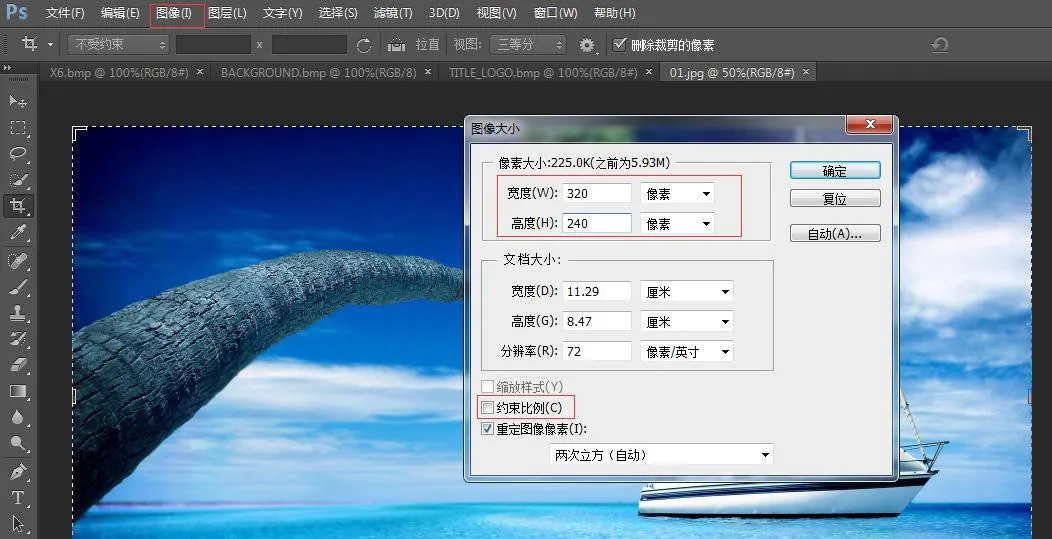 <
전화기 모델에 맞춰 가로, 세로 치수를 설정합니다. 「비율 고정」체크 해제 후 확인 클릭
<
전화기 모델에 맞춰 가로, 세로 치수를 설정합니다. 「비율 고정」체크 해제 후 확인 클릭
2.2 파일 → 다른 이름으로 저장 → BMP 형식 선택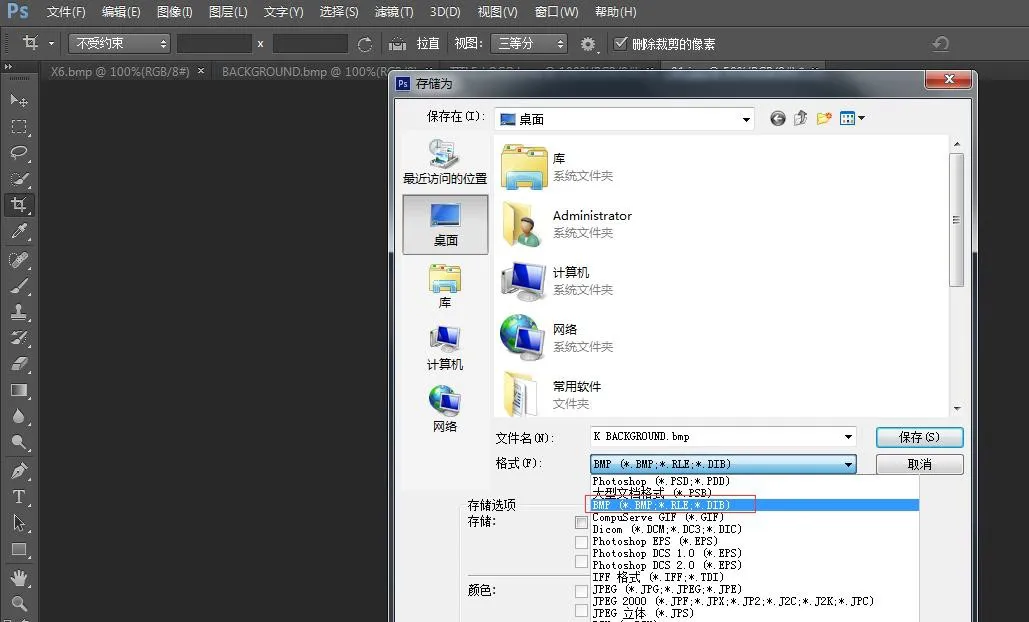
2.3 저장 클릭 후 모델에 맞는 색 심도를 선택합니다: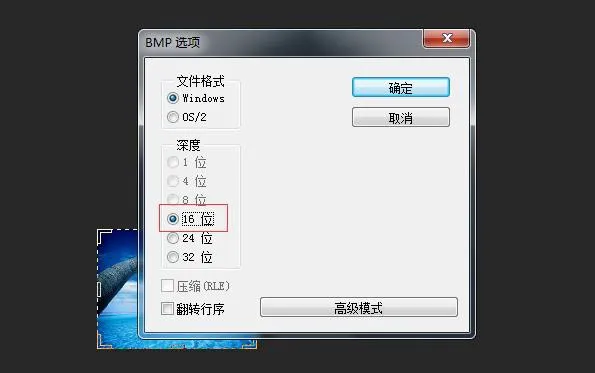 <
전화기 모델에 대응하는 색 심도를 선택하고 확인을 눌러 이미지 제작을 완료합니다.
<
전화기 모델에 대응하는 색 심도를 선택하고 확인을 눌러 이미지 제작을 완료합니다.
3. 타이틀 로고, 단축키 아이콘, DSS 키 아이콘은 동일한 제작 방식을 따릅니다.
4. etc.tar.gz 패키지 제작 방법
7-Zip 툴 사용 (예시: ICON_SERVICE.bmp)
1) 파일 우클릭 → 7-Zip → 아카이브에 추가 → 아카이브 형식: tar → 확인 → etc.tar 파일 생성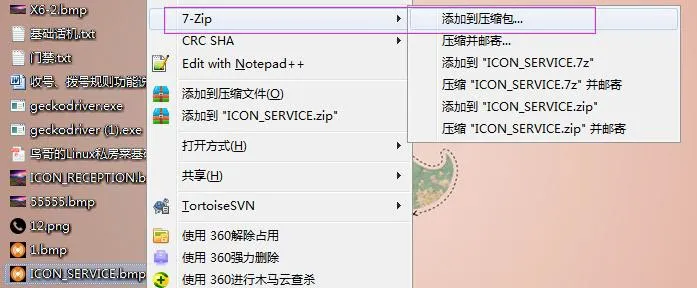
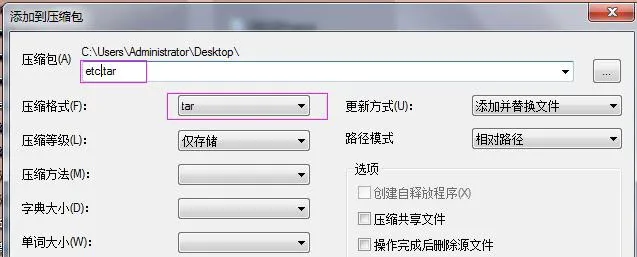
2) etc.tar 파일 우클릭 → 7-Zip → 아카이브에 추가 → 아카이브 형식: gzip → 확인 → etc.tar.gz 파일 생성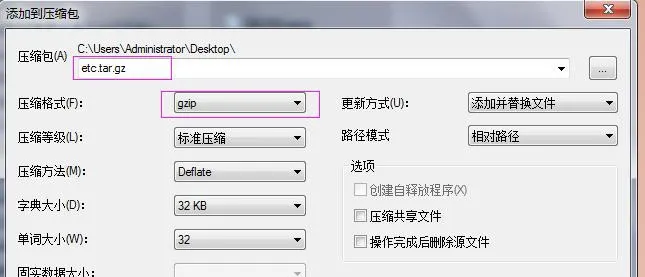
BX3S/BX4/BH5 배경화면 업그레이드
H5 시리즈 기기는 배경화면, 타이틀 로고 및 대기 화면 단축키 아이콘 업그레이드를 지원합니다. 전화기 웹 UI에 로그인한 뒤 전화기 설정 → 고급 → 화면 이미지 경로에서 .bmp 또는 etc.tar.gz 파일을 업로드합니다.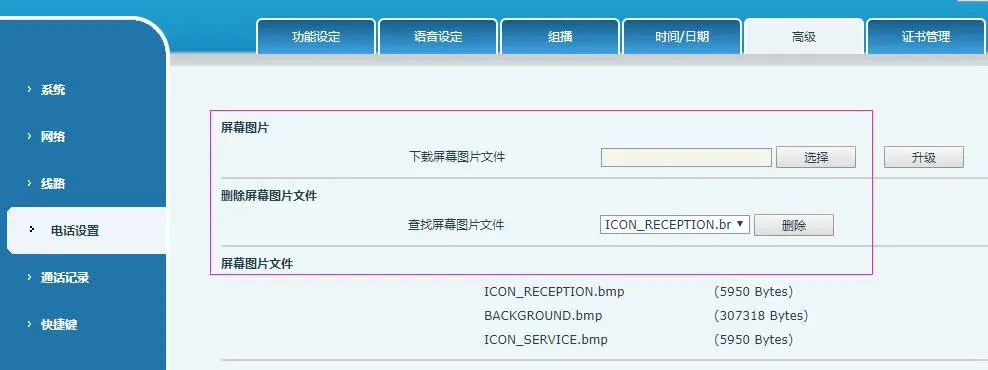 <
업그레이드 완료 후 해당 페이지에서 이미지 조회 및 삭제가 가능합니다.
<
업그레이드 완료 후 해당 페이지에서 이미지 조회 및 삭제가 가능합니다.
BX5S/BX6/BX7/BX7C/GP210/GP210i 배경화면 업그레이드
전화기 웹 UI에 로그인 → 시스템 → 업그레이드 → 배경화면 업그레이드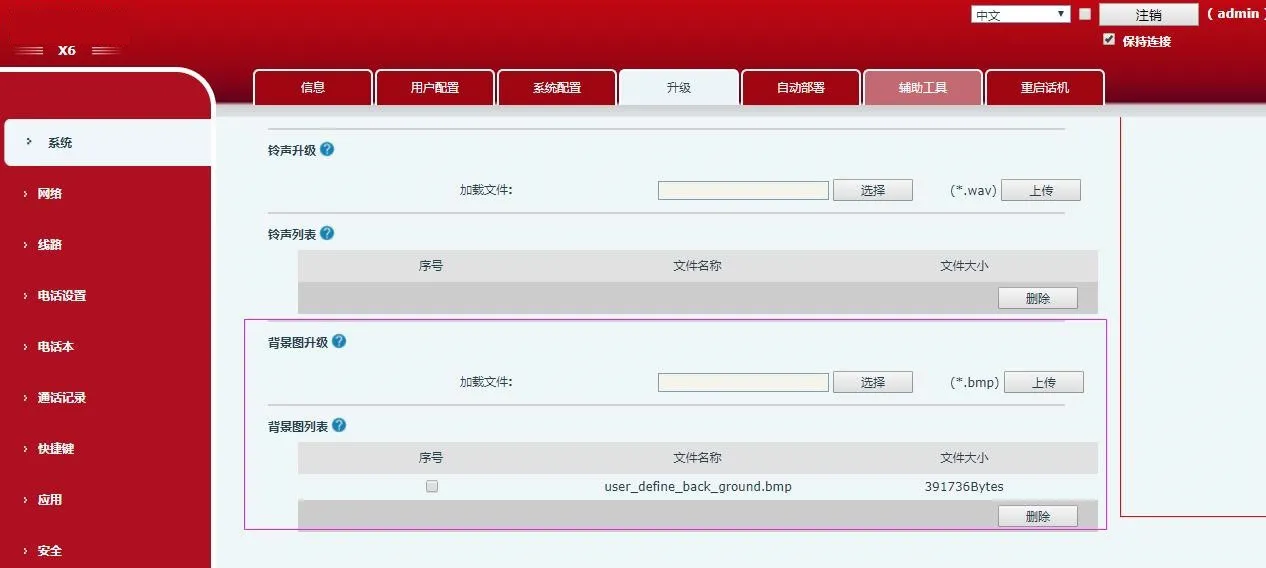 <
업그레이드 성공 시 해당 페이지에서 배경화면 조회·삭제가 가능합니다.
<
업그레이드 성공 시 해당 페이지에서 배경화면 조회·삭제가 가능합니다.
BX4U/BX5U/BX6U/BX5S/BX6/BX7/BX7C/GP210/GP210i DSS 키 아이콘 업그레이드(2가지 방식)
1) 개별 업그레이드 (.png)
웹 UI 경로: 시스템 → 업그레이드 → DSS 키 아이콘 업그레이드. 표 4의 명명 규칙을 준수한 맞춤 아이콘을 업로드하면 DSS 키 아이콘 목록에 표시됩니다.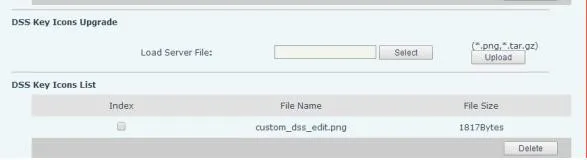
2) 일괄 업그레이드 (.tar.gz)
다량의 아이콘을 한 번에 업그레이드할 때 .tar.gz 패키지를 사용하며, 패키지명은 자유롭게 지정할 수 있습니다.
① Linux 압축 명령어: tar –zcvf etc.tar.gz xxx.png xxx1.png
② Windows 압축 방식(7-Zip 사용):
- 파일 선택 후 우클릭 → 7-Zip → 아카이브에 추가 → tar 형식 → 확인 (etc.tar 생성)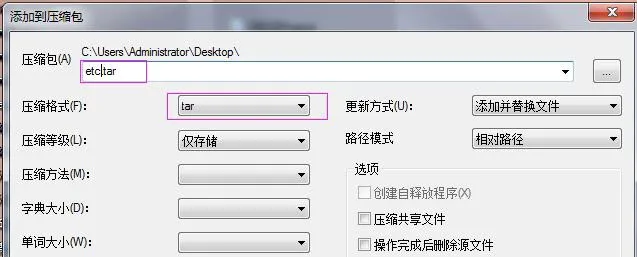 - etc.tar 파일 우클릭 → 7-Zip → 아카이브에 추가 → gzip 형식 → 확인 (etc.tar.gz 생성)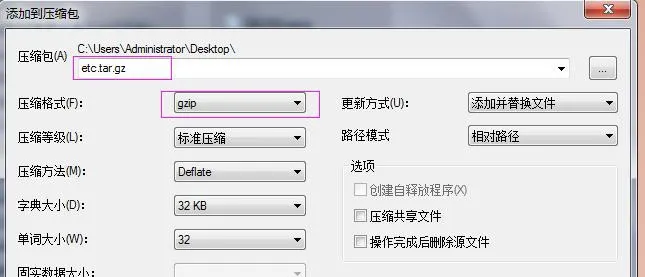
업그레이드 완료 후 웹 UI에서 맞춤 DSS 키 아이콘을 선택하여 적용할 수 있습니다.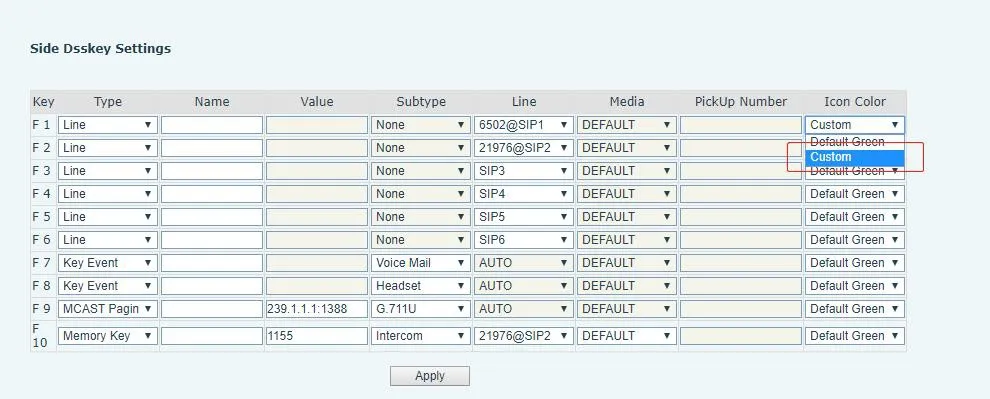
BX34 시리즈 자동 프로비저닝(배경화면, 타이틀 로고; H5는 단축키 아이콘 지원)
설정 파일 내
| Auto | Etc | Url | : ftp://1:1@172.16.6.62/BACKGROUND.bmp |
| Auto | Etc | Url | : ftp://1:1@172.16.6.62/TITLE_LOGO.bmp |
| Auto | Etc | Url | : ftp://1:1@172.16.6.62/etc.tar.gz |
설정 예시(BACKGROUND.bmp):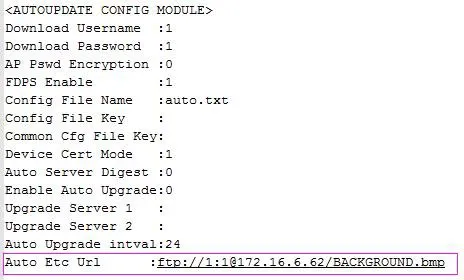
BX4U/BX5U/BX6U/BX5S/BX6/BX7/BX7C/GP210/GP210i 기기는 배경화면 및 DSS 키 아이콘에 동일한 자동 프로비저닝 방식을 사용하며, 타이틀 로고 기능은 지원하지 않습니다. 파일명은 자유롭게 지정할 수 있습니다. 예시(BX6):
Auto Etc Url : ftp://1:1@172.16.6.62/X6.bmp
Auto Etc Url : ftp://1:1@172.16.6.62/etc.tar.gz