
SIP 실내 전화기의 단축키 설정 가이드입니다. Memory Key, Line, Event Key, DTMF, URL, BLF List, MCAST Paging, Action URL을 i51W, i52W, i53W, i56A 모델 기준으로 설명합니다.
이 문서는 i 시리즈 실내 전화기에서 설정 가능한 단축키의 정의와 사용 방법을 자세히 설명합니다.
모든 i 시리즈 실내 전화기에 적용되며, i51W, i52W, i53W, i56A 모델을 포함합니다.
① i 시리즈 실내 전화기 1대, PoE 스위치 또는 DC 전원으로 장비에 네트워크와 전원을 공급합니다.
② 디버깅용 컴퓨터 1대. 동일한 스위치에 연결하여 컴퓨터와 실내 전화기가 네트워크로 통신할 수 있도록 합니다.
PoE 스위치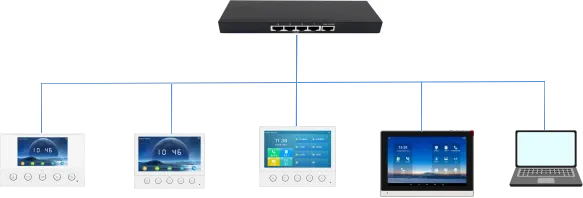
i51W i52W i53W i56A 컴퓨터
기능에 따라 단축키는 다음과 같은 주요 범주로 나눌 수 있습니다.
Memory Key
Line
Event Key
DTMF
URL
BLF List Key
MCAST Paging/MCAST Listening
Action URL
XML Browser
Application
참고: 각 실내 전화기의 제품 포지셔닝과 시스템 솔루션이 다르기 때문에 단축키 범주는 모델별로 다를 수 있습니다. i51W/i52W/i53W에는 XML Browser와 Application 범주가 없고, i51W/i52W에는 MCAST Listening과 BLF List Key가 없습니다.
구체적인 기능에 따라 Memory Key는 다음 하위 유형으로 나눌 수 있습니다.
1. None
2. BLF related configuration
3. Presence
4. Voice Mail
5. Speed Dial
6. Intercom
7. Call Park
8. Call Forward
i51W와 i52W는 터치스크린이 없기 때문에 Memory Key 및 Event Key의 하위 유형이 i53W, i56A와 다릅니다. i51W와 i52W의 Memory Key는 Speed Dial 또는 Intercom으로만 정의할 수 있고, Event Key는 Do-not-disturb, Handfree, OK, End, Intercom으로만 정의할 수 있습니다.
3.1.1. BLF related configuration
기능 설명: 이 기능은 BLF can indicate the status of a subscribed extension and can pick up the call w에 해당하는 작업을 수행하며 SIP 회선, 통화, 연락처 또는 서비스 기능을 빠르게 조작하는 데 사용됩니다.
설정 항목: 유형: Memory Key
값: BLF related configuration / DSS value
회선: SIP account used for outgoing calls or subscription
하위 유형: BLF related configuration
픽업 번호: optional server pickup code
사용 방법: 이 기능은 Press the configured key in standby, ringing or call status to execute the assig에 해당하는 작업을 수행하며 SIP 회선, 통화, 연락처 또는 서비스 기능을 빠르게 조작하는 데 사용됩니다.
3.1.2. Presence
기능 설명: 이 기능은 Presence shows line status through the indicator and can also show whether the o에 해당하는 작업을 수행하며 SIP 회선, 통화, 연락처 또는 서비스 기능을 빠르게 조작하는 데 사용됩니다.
설정 항목: 유형: Memory Key
값: Presence / DSS value
회선: SIP account used for outgoing calls or subscription
하위 유형: Presence
픽업 번호: optional server pickup code
사용 방법: 이 기능은 Press the configured key in standby, ringing or call status to execute the assig에 해당하는 작업을 수행하며 SIP 회선, 통화, 연락처 또는 서비스 기능을 빠르게 조작하는 데 사용됩니다.
3.1.3. Voice Mail
기능 설명: 이 기능은 Voice Mail is used to listen to messages에 해당하는 작업을 수행하며 SIP 회선, 통화, 연락처 또는 서비스 기능을 빠르게 조작하는 데 사용됩니다.
설정 항목: 유형: Memory Key
값: Voice Mail / DSS value
회선: SIP account used for outgoing calls or subscription
하위 유형: Voice Mail
사용 방법: 이 기능은 Press the configured key in standby, ringing or call status to execute the assig에 해당하는 작업을 수행하며 SIP 회선, 통화, 연락처 또는 서비스 기능을 빠르게 조작하는 데 사용됩니다.
3.1.4. Speed Dial
기능 설명: 이 기능은 Speed Dial is used for frequently dialed or hard-to-remember numbers에 해당하는 작업을 수행하며 SIP 회선, 통화, 연락처 또는 서비스 기능을 빠르게 조작하는 데 사용됩니다.
설정 항목: 유형: Memory Key
값: Speed Dial / DSS value
회선: SIP account used for outgoing calls or subscription
하위 유형: Speed Dial
사용 방법: 이 기능은 Press the configured key in standby, ringing or call status to execute the assig에 해당하는 작업을 수행하며 SIP 회선, 통화, 연락처 또는 서비스 기능을 빠르게 조작하는 데 사용됩니다.
3.1.5. Intercom
기능 설명: 이 기능은 Intercom enables automatic answering and direct conversation with the configured에 해당하는 작업을 수행하며 SIP 회선, 통화, 연락처 또는 서비스 기능을 빠르게 조작하는 데 사용됩니다.
설정 항목: 유형: Memory Key
값: Intercom / DSS value
회선: SIP account used for outgoing calls or subscription
하위 유형: Intercom
사용 방법: 이 기능은 Press the configured key in standby, ringing or call status to execute the assig에 해당하는 작업을 수행하며 SIP 회선, 통화, 연락처 또는 서비스 기능을 빠르게 조작하는 데 사용됩니다.
3.1.6. Call Park
기능 설명: 이 기능은 Call Park temporarily parks a call on the server, so the user can retrieve the c에 해당하는 작업을 수행하며 SIP 회선, 통화, 연락처 또는 서비스 기능을 빠르게 조작하는 데 사용됩니다.
설정 항목: 유형: Memory Key
값: Call Park / DSS value
회선: SIP account used for outgoing calls or subscription
하위 유형: Call Park
사용 방법: 이 기능은 Press the configured key in standby, ringing or call status to execute the assig에 해당하는 작업을 수행하며 SIP 회선, 통화, 연락처 또는 서비스 기능을 빠르게 조작하는 데 사용됩니다.
3.1.7. Call Forward
기능 설명: 이 기능은 Call Forward transfers an incoming call to the configured destination number wit에 해당하는 작업을 수행하며 SIP 회선, 통화, 연락처 또는 서비스 기능을 빠르게 조작하는 데 사용됩니다.
설정 항목: 유형: Memory Key
값: Call Forward / DSS value
회선: SIP account used for outgoing calls or subscription
하위 유형: Call Forward
사용 방법: 이 기능은 Press the configured key in standby, ringing or call status to execute the assig에 해당하는 작업을 수행하며 SIP 회선, 통화, 연락처 또는 서비스 기능을 빠르게 조작하는 데 사용됩니다.
Line 키를 누릅니다. 회선이 등록되어 있지 않으면 회선 설정 모드로 들어가고, 이미 등록되어 있으면 다이얼 모드로 들어가 번호를 입력하여 전화를 걸 수 있습니다.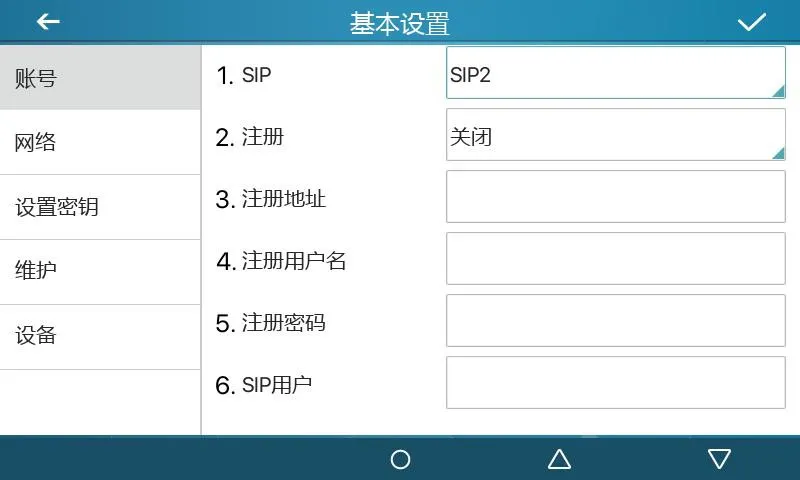
그림 1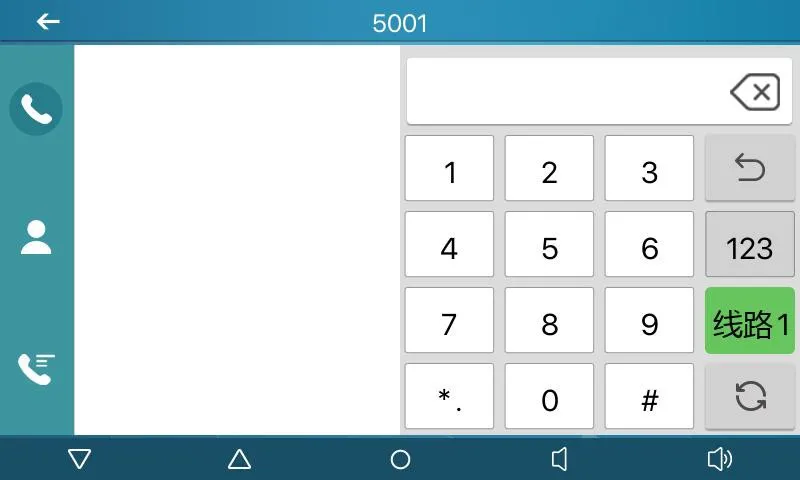
그림 2
기능 설명: 하위 유형을 통해 특정 전용 기능 키로 설정합니다. 하위 유형에 따라 기능과 사용 방법이 다릅니다.
설정 항목: 유형: Event Key
하위 유형: selected function type
사용 방법:
3.3.1 None:
기능 없음.
3.3.2 Voice Mail:
이 기능은 Checks voice mail information for all SIP lines and can call the mailbox of the 에 해당하는 작업을 수행하며 SIP 회선, 통화, 연락처 또는 서비스 기능을 빠르게 조작하는 데 사용됩니다.
3.3.3 Do-not-disturb:
이 기능은 Enables do-not-disturb for the whole device or for a selected SIP line에 해당하는 작업을 수행하며 SIP 회선, 통화, 연락처 또는 서비스 기능을 빠르게 조작하는 데 사용됩니다.
3.3.4 Call Hold:
이 기능은 Places the current call on hold like a physical Hold key에 해당하는 작업을 수행하며 SIP 회선, 통화, 연락처 또는 서비스 기능을 빠르게 조작하는 데 사용됩니다.
3.3.5 Transfer:
이 기능은 Transfers the current call like a Transfer key or Xfer softkey에 해당하는 작업을 수행하며 SIP 회선, 통화, 연락처 또는 서비스 기능을 빠르게 조작하는 데 사용됩니다.
3.3.6 Phonebook:
이 기능은 Opens the contact directory에 해당하는 작업을 수행하며 SIP 회선, 통화, 연락처 또는 서비스 기능을 빠르게 조작하는 데 사용됩니다.
3.3.7 Redial:
이 기능은 Redials the last outgoing number using the previous line에 해당하는 작업을 수행하며 SIP 회선, 통화, 연락처 또는 서비스 기능을 빠르게 조작하는 데 사용됩니다.
3.3.8 Pick up:
이 기능은 Answers an incoming call that is ringing on another phone after the ringing phon에 해당하는 작업을 수행하며 SIP 회선, 통화, 연락처 또는 서비스 기능을 빠르게 조작하는 데 사용됩니다.
3.3.9 Join:
이 기능은 Allows the test phone to join an existing call after entering the target phone n에 해당하는 작업을 수행하며 SIP 회선, 통화, 연락처 또는 서비스 기능을 빠르게 조작하는 데 사용됩니다.
3.3.10 Call Forward:
이 기능은 Opens call forwarding settings in standby mode에 해당하는 작업을 수행하며 SIP 회선, 통화, 연락처 또는 서비스 기능을 빠르게 조작하는 데 사용됩니다.
3.3.11 Call Logs:
이 기능은 Opens call history and call record information에 해당하는 작업을 수행하며 SIP 회선, 통화, 연락처 또는 서비스 기능을 빠르게 조작하는 데 사용됩니다.
3.3.12 Flash:
이 기능은 Holds the current call and opens a new dialing state with dial tone에 해당하는 작업을 수행하며 SIP 회선, 통화, 연락처 또는 서비스 기능을 빠르게 조작하는 데 사용됩니다.
3.3.13 Memo:
이 기능은 Opens the memo application for note management에 해당하는 작업을 수행하며 SIP 회선, 통화, 연락처 또는 서비스 기능을 빠르게 조작하는 데 사용됩니다.
3.3.14 Headset:
이 기능은 Works like the physical headset key for answering and hanging up calls에 해당하는 작업을 수행하며 SIP 회선, 통화, 연락처 또는 서비스 기능을 빠르게 조작하는 데 사용됩니다.
3.3.15 Release:
이 기능은 Exits the LCD menu or hangs up all calls and returns to standby에 해당하는 작업을 수행하며 SIP 회선, 통화, 연락처 또는 서비스 기능을 빠르게 조작하는 데 사용됩니다.
3.3.16 Lock phone:
이 기능은 Locks the phone from standby mode에 해당하는 작업을 수행하며 SIP 회선, 통화, 연락처 또는 서비스 기능을 빠르게 조작하는 데 사용됩니다.
3.3.17 SMS:
이 기능은 Opens the SMS interface for sending, receiving and browsing messages에 해당하는 작업을 수행하며 SIP 회선, 통화, 연락처 또는 서비스 기능을 빠르게 조작하는 데 사용됩니다.
3.3.18 Call Back:
이 기능은 Calls back the last incoming number after off-hook에 해당하는 작업을 수행하며 SIP 회선, 통화, 연락처 또는 서비스 기능을 빠르게 조작하는 데 사용됩니다.
3.3.19 Hide DTMF:
이 기능은 Opens the setting mode for DTMF hidden display에 해당하는 작업을 수행하며 SIP 회선, 통화, 연락처 또는 서비스 기능을 빠르게 조작하는 데 사용됩니다.
3.3.20 Intercom:
이 기능은 Enables Intercom mode and automatic answering when no other call is active에 해당하는 작업을 수행하며 SIP 회선, 통화, 연락처 또는 서비스 기능을 빠르게 조작하는 데 사용됩니다.
3.3.21 Group Listening:
이 기능은 Enables group listening during handset or headset calls; audio is played, while 에 해당하는 작업을 수행하며 SIP 회선, 통화, 연락처 또는 서비스 기능을 빠르게 조작하는 데 사용됩니다.
3.3.22 Prefix:
이 기능은 Adds the configured outside-line prefix after off-hook, so users do not need to 에 해당하는 작업을 수행하며 SIP 회선, 통화, 연락처 또는 서비스 기능을 빠르게 조작하는 데 사용됩니다.
3.3.23 Hot Desking:
이 기능은 Clears all SIP configurations after the configured DSS key is pressed and OK is 에 해당하는 작업을 수행하며 SIP 회선, 통화, 연락처 또는 서비스 기능을 빠르게 조작하는 데 사용됩니다.
3.3.24 Agent:
이 기능은 Opens the Agent interface에 해당하는 작업을 수행하며 SIP 회선, 통화, 연락처 또는 서비스 기능을 빠르게 조작하는 데 사용됩니다.
3.3.25 End:
이 기능은 Performs the End function on the call interface에 해당하는 작업을 수행하며 SIP 회선, 통화, 연락처 또는 서비스 기능을 빠르게 조작하는 데 사용됩니다.
3.3.26 Disposition:
이 기능은 Broadsoft Call Center function that sends Disposition Code Info during and after에 해당하는 작업을 수행하며 SIP 회선, 통화, 연락처 또는 서비스 기능을 빠르게 조작하는 데 사용됩니다.
3.3.27 Escalate:
이 기능은 Broadsoft Call Center function that sends SIP Info and selects a Supervisor auto에 해당하는 작업을 수행하며 SIP 회선, 통화, 연락처 또는 서비스 기능을 빠르게 조작하는 데 사용됩니다.
3.3.28 Trace:
이 기능은 Broadsoft function similar to Disposition, supporting information sending during에 해당하는 작업을 수행하며 SIP 회선, 통화, 연락처 또는 서비스 기능을 빠르게 조작하는 데 사용됩니다.
3.3.29 Handfree:
이 기능은 Enters hands-free mode에 해당하는 작업을 수행하며 SIP 회선, 통화, 연락처 또는 서비스 기능을 빠르게 조작하는 데 사용됩니다.
3.3.30 Answer Key:
이 기능은 Answers the incoming call에 해당하는 작업을 수행하며 SIP 회선, 통화, 연락처 또는 서비스 기능을 빠르게 조작하는 데 사용됩니다.
3.3.31 Private Hold:
이 기능은 Broadsoft function that prevents other users from retrieving the held call에 해당하는 작업을 수행하며 SIP 회선, 통화, 연락처 또는 서비스 기능을 빠르게 조작하는 데 사용됩니다.
3.3.32 Local Contacts:
이 기능은 Opens the local contacts interface에 해당하는 작업을 수행하며 SIP 회선, 통화, 연락처 또는 서비스 기능을 빠르게 조작하는 데 사용됩니다.
3.3.33 LDAP Group:
이 기능은 Accesses the LDAP network phonebook when LDAP phonebook is enabled에 해당하는 작업을 수행하며 SIP 회선, 통화, 연락처 또는 서비스 기능을 빠르게 조작하는 데 사용됩니다.
3.3.34 XML Group:
이 기능은 Accesses the selected XML network phonebook when XML phonebook is enabled에 해당하는 작업을 수행하며 SIP 회선, 통화, 연락처 또는 서비스 기능을 빠르게 조작하는 데 사용됩니다.
3.3.35 Broadsoft Group:
이 기능은 Accesses the Broadsoft network phonebook when it is enabled에 해당하는 작업을 수행하며 SIP 회선, 통화, 연락처 또는 서비스 기능을 빠르게 조작하는 데 사용됩니다.
3.3.36 Record:
이 기능은 Starts call recording when the phone has been configured for recording에 해당하는 작업을 수행하며 SIP 회선, 통화, 연락처 또는 서비스 기능을 빠르게 조작하는 데 사용됩니다.
3.3.37 Auto Headset:
이 기능은 Enables or disables headset answering; the DSS key stays steady green에 해당하는 작업을 수행하며 SIP 회선, 통화, 연락처 또는 서비스 기능을 빠르게 조작하는 데 사용됩니다.
기능 설명: 빠른 2차 다이얼에 사용되며 2차 다이얼 내용을 기억할 필요가 없습니다. 통화 중 이 키를 누르면 설정된 번호 시퀀스를 원격 측에 순서대로 전송합니다.
설정 항목: 유형: DTMF
값: DTMF secondary dialing key sequence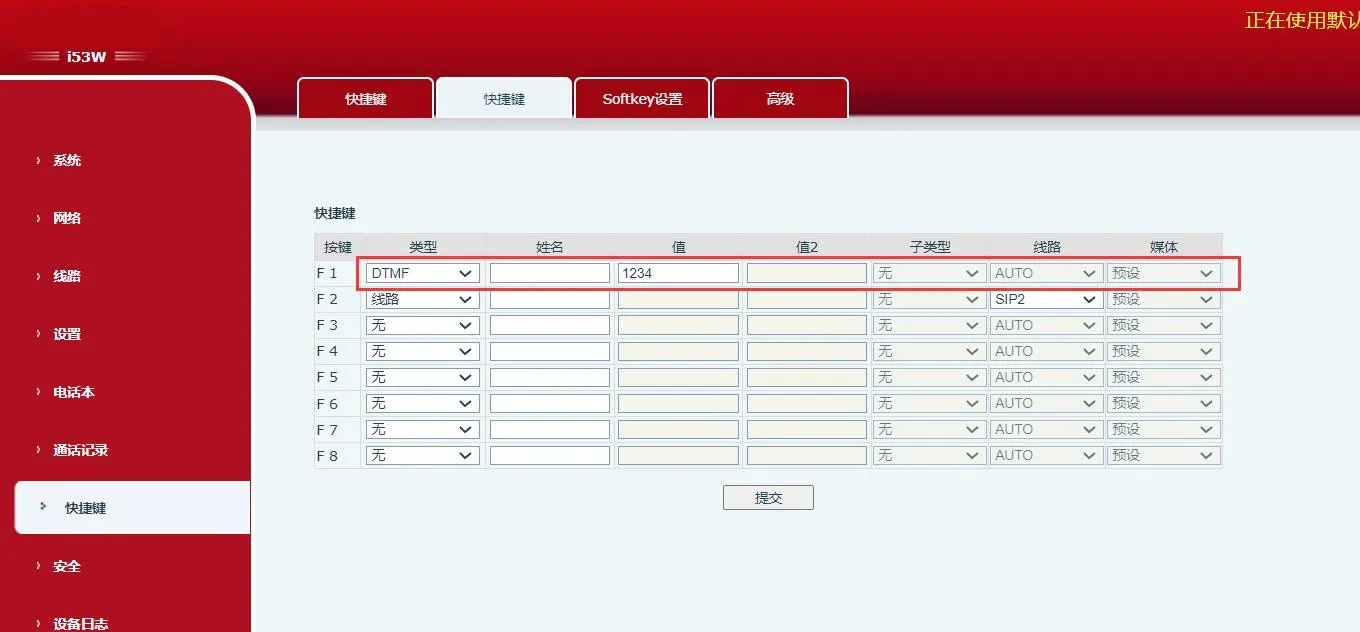 그림 3
그림 3
기능 설명: 설정된 유효한 원격 URL에 직접 접근할 때 사용합니다.
설정 항목: 유형: URL
값: complete remote URL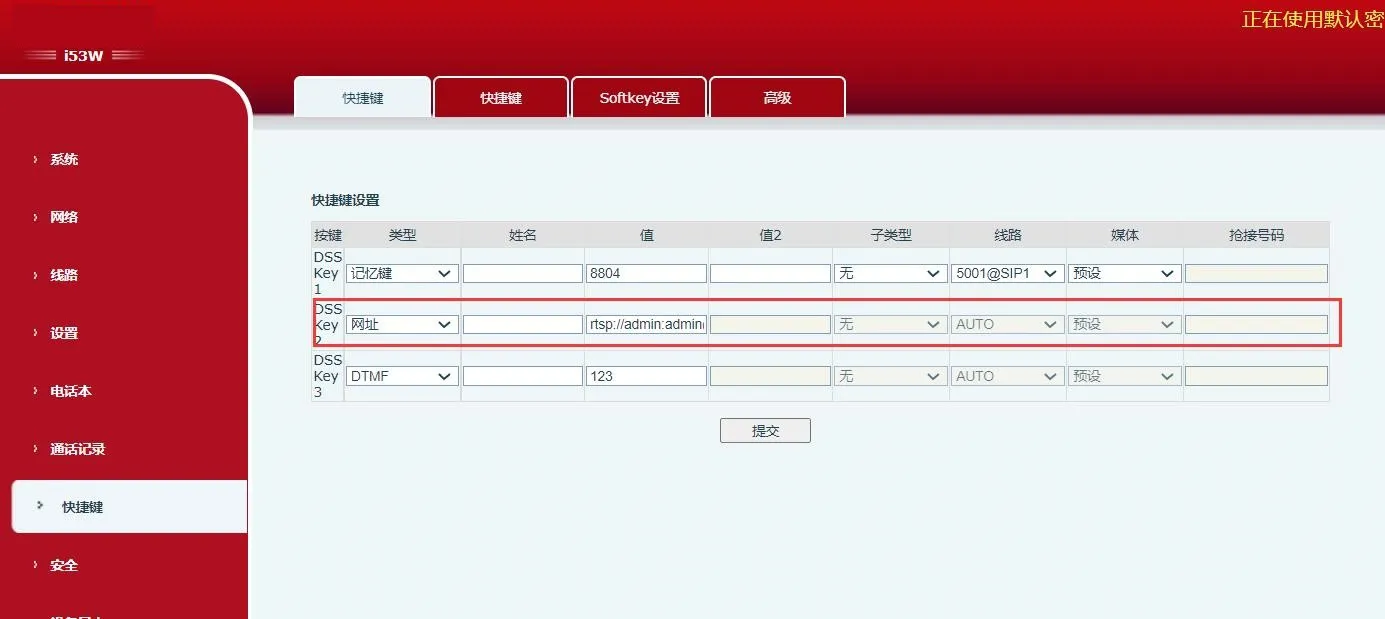 그림 4
그림 4
기능 설명: 서버와 함께 사용해야 합니다. 기존 BLF는 번호 하나마다 Subscribe를 사용합니다. BLF List Key는 서버에서 번호를 그룹화하고 그룹 URL로 구독하며 Notify 메시지를 분석해 키 LED에 상태를 표시합니다.
설정 항목: 유형: BLF List Key
사용 방법: server automatically delivers subscribed number list to DSS keys.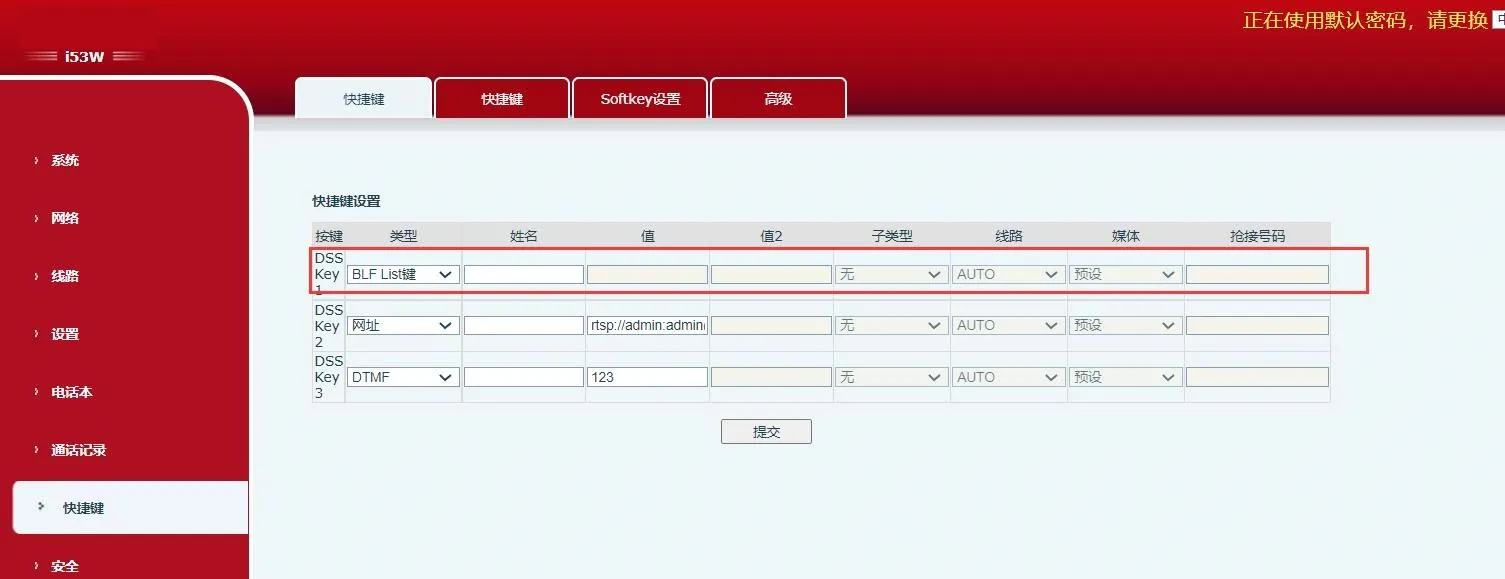 그림 5
그림 5
기능 설명: 멀티캐스트 주소와 음성 코덱을 설정한 후 이 키를 누르면 멀티캐스트 RTP 스트림을 보낼 수 있습니다. 다시 누르면 멀티캐스트를 종료하고 전화를 끊습니다.
설정 항목: 유형: MCAST Paging / MCAST Listening
값: multicast listening address and port
하위 유형: RTP audio codec used by sender and receiver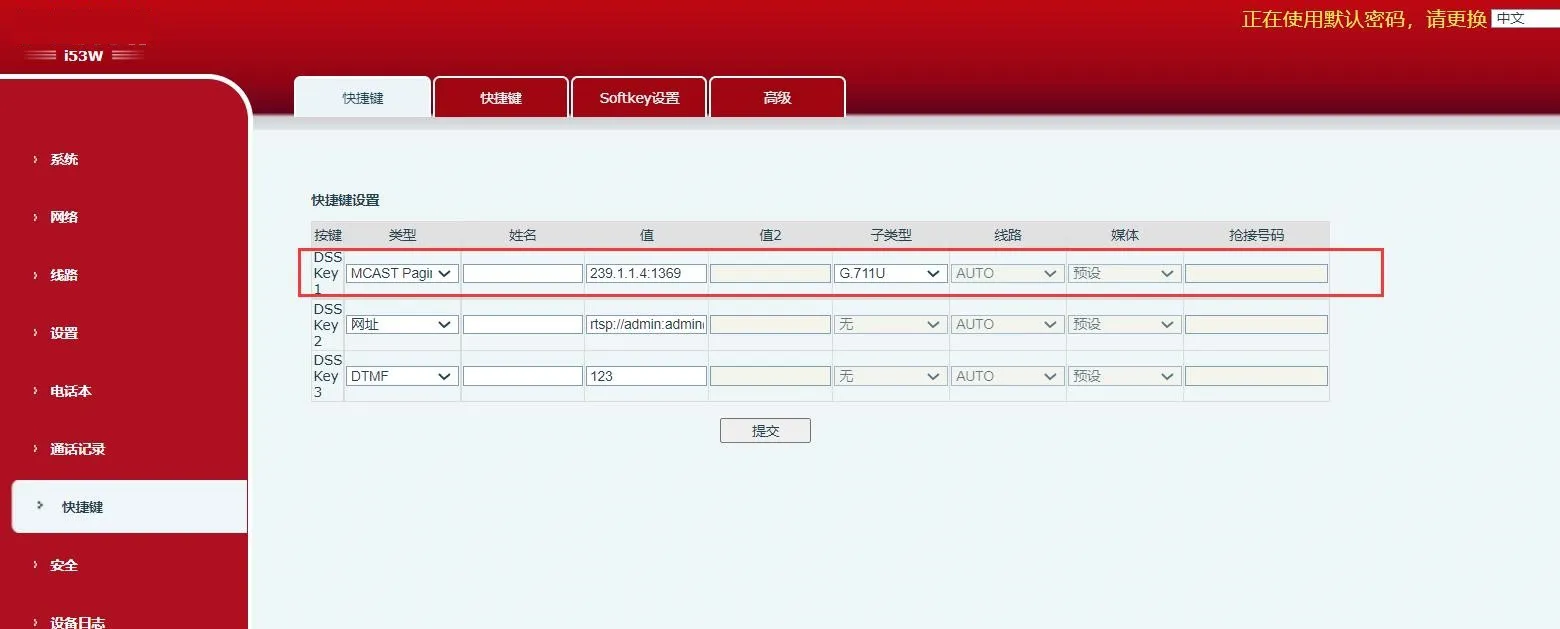
그림 6
기능 설명: 설정된 URL은 ¥ 형식의 변수 매개변수를 지원합니다. 사용자가 DSS 키를 누르면 시스템이 HTTP GET 또는 POST 요청을 시작합니다.
설정 항목: 유형: Action URL
값: valid URL
하위 유형: POST or GET