

When seconds determine outcomes, communication infrastructure becomes the most vital component of any safety and continuity strategy. A Mass Notification System (MNS) paired with specialized Emergency Notification Software delivers that infrastructure—an integrated, multichannel platform designed to reach the right people, on the right devices, at the exact moment a crisis unfolds. This guide goes beyond surface-level descriptions to examine the technical architecture, advanced features, integration patterns, deployment models, and evaluation criteria that define a modern, enterprise-grade notification ecosystem.
Related Solution Introduction:mass notification system
Defining the Core Components: MNS vs. Emergency Notification Software
Though often used interchangeably, the two terms emphasize different layers of the communication stack:
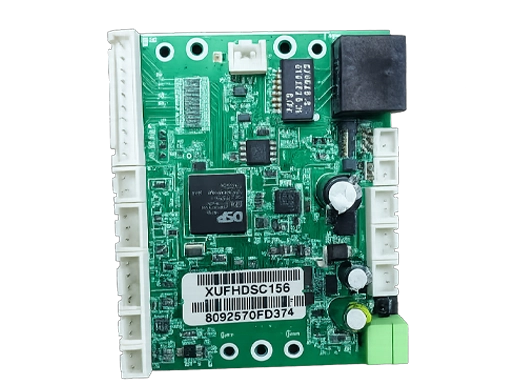
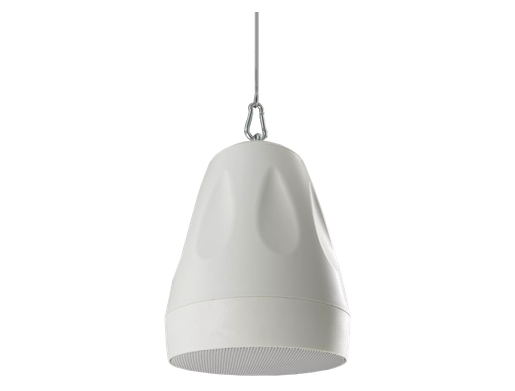
Mass Notification System (MNS): The overarching platform encompassing hardware and software that delivers high-volume, one-to-many alerts. It includes on-premises devices like giant voice systems, digital signage controllers, and IP speakers, in addition to the software that orchestrates them.
Emergency Notification Software: The application layer that manages message composition, contact databases, delivery logic, incident workflows, and audit trails. It provides the user interface and automation engine, often cloud-based, that fuels both life-safety and operational notifications.
Together, they form a unified notification fabric that connects people, sensors, and response protocols across the entire organization.
Technical Architecture of a Modern Notification Platform
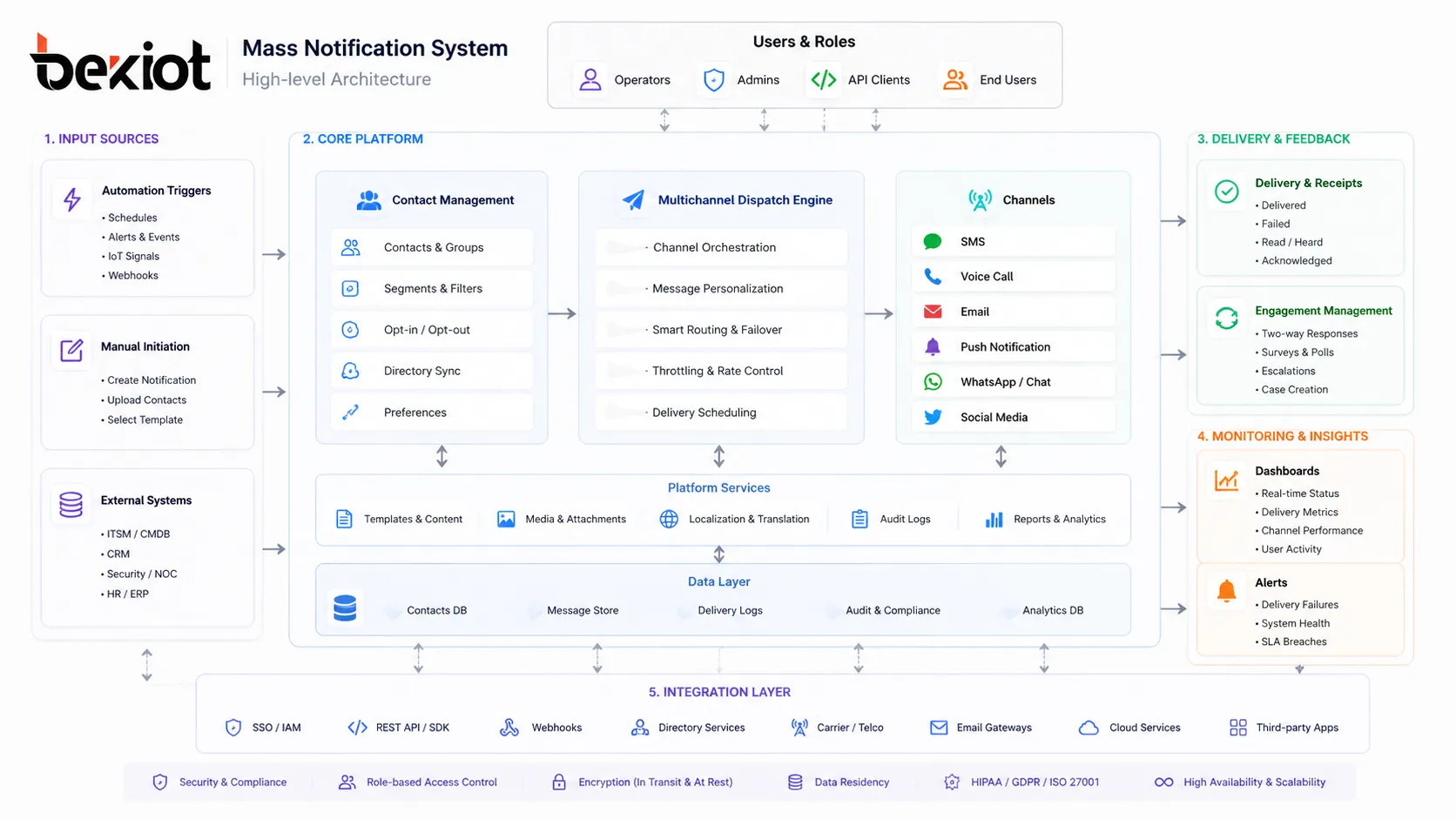
A resilient notification platform is built on a distributed, microservices-based architecture designed for infinite horizontal scaling. Understanding its internal building blocks is essential for architects and IT decision-makers.
1. Multichannel Dispatch Engine
The engine concurrently broadcasts messages through a minimum of five to twelve communication paths. Each channel is served by dedicated adapters that handle protocol translation, rate limiting, and provider failover:
SMS/MMS: Utilizes SMPP (Short Message Peer-to-Peer) protocol or direct carrier connections. Evaluated by throughput (messages per second) and delivery receipts with sub-second latency.
Voice Calls: Powered by SIP (Session Initiation Protocol) trunks and text-to-speech (TTS) engines supporting SSML (Speech Synthesis Markup Language) for natural prosody and multilingual pronunciation.
Email: Relies on SMTP with DKIM/SPF authentication, often integrated with AWS SES or SendGrid for deliverability monitoring and dedicated IP warming.
Mobile Push Notifications: Sent via Firebase Cloud Messaging (FCM) for Android and Apple Push Notification service (APNs) for iOS, supporting rich media attachments, critical alerts that bypass Do Not Disturb, and actionable buttons.
Desktop Alerts: Delivered through WebSocket connections to endpoint agents or via integrated browsers using the Web Push API, ensuring visibility even when applications are minimized.
Digital Signage & IPTV: Content pushed through REST APIs to media players (e.g., BrightSign, Chrome devices) using HTML5 templates, capable of overriding scheduled content instantly.
On-Premises Giant Voice & Strobe: Controlled by TCP/IP commands or SNMP traps sent to alerting appliances, allowing direct activation of sirens, public address speakers, and visual strobes.
Social Media & RSS: Automated posting to X (Twitter), Facebook, and internal portals via OAuth 2.0 authenticated APIs, formatted per character limits and audience targeting.
IPAWS/EAS/WEA: For U.S. public authorities, messages formatted in CAP (Common Alerting Protocol) v1.2 XML are transmitted to FEMA’s IPAWS-OPEN gateway to disseminate Wireless Emergency Alerts, Emergency Alert System broadcasts, and NOAA weather radio activations.
2. Intelligent Contact Management & Dynamic Grouping
Static distribution lists are obsolete. Modern emergency notification software builds recipient groups on the fly by querying federated data sources:
HRIS & Active Directory Sync: Leverages SCIM 2.0 (System for Cross-domain Identity Management), LDAP queries, or API connectors to platforms like Workday, BambooHR, and Azure AD. It continuously syncs attributes—department, office location, shift schedule, manager, certifications—to enable granular targeting.
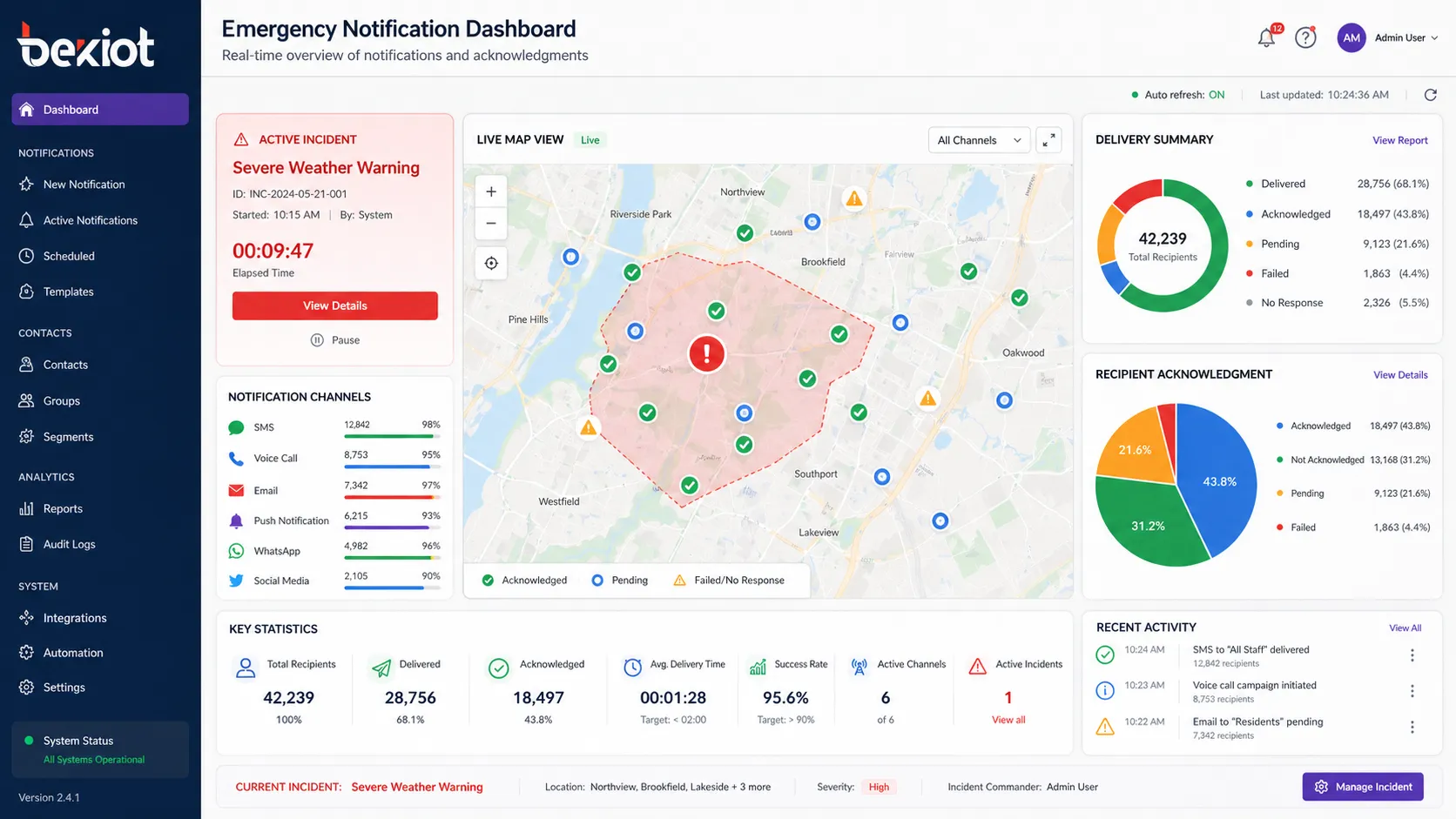
Geospatial Grouping: Uses real-time device coordinates, building floor plans with BLE beacons, or network-based location (IP subnet mapping) to select recipients within a polygon drawn on a map. Triggering a tornado warning only reaches people inside the affected facility, not those traveling abroad.
Role-Based & Dynamic Tags: Fire wardens, floor marshals, CERT members, or on-call engineers are tagged and automatically included in incident response flows without manual list creation.
3. Scenario Automation & Triggered Workflows
Human-initiated alerts are critical, but the fastest alerts fire without a human in the loop. The software ingests external events and executes pre-configured playbooks:
CAP Feed Ingestion: Listens to public and private CAP feeds (XML-over-HTTP Atom/RSS) from weather services like the National Weather Service, earthquake detectors, or industrial monitoring systems. Parses event urgency, severity, and certainty to decide whether to auto-launch.
IoT & Sensor Integration: Connects to MQTT brokers or REST endpoints from gas detectors, gunshot detection systems (e.g., ShotSpotter), panic buttons, and network intrusion detection systems. A H2S sensor spike in a refinery can instantly trigger a shelter-in-place alert with specific zone mapping.
Physical Security System Tie-Ins: Integrates with access control (Lenel, Genetec) and video management systems (VMS) via ONVIF or proprietary SDKs. A forced-door alarm in a restricted area triggers an alert to security staff along with a live surveillance feed link.
Webhooks & Custom API Triggers: Accepts JSON payloads from any internal application—IT service management (ServiceNow), infrastructure monitoring (PagerDuty, Datadog), or CI/CD pipelines—to broadcast service outages to affected engineering teams.
4. Two-Way Communication & Accountability Engine
Sending a message is only half the equation; confirming receipt and gathering status is the other. Detailed capabilities include:
Read Receipts & Delivery Confirmations: Tracks SMS delivery reports, email open tracking (via pixel), voice call answer detection, and push notification interaction. Aggregates into a real-time dashboard showing who has and hasn’t been reached.
Self-Reporting & Surveys: Recipients can reply with preset codes (“1” for safe, “2” for need help) or fill out mini-forms. Responses automatically update personnel accountability reports (PAR) and can trigger escalation if a floor marshal fails to respond.
Conference Bridge Bridging: Automatically creates a conferencing bridge (PSTN or VoIP) and invites incident commanders with a single click, collapsing communication loops.
Deep Dive: Key Technological Differentiators
When evaluating software, IT teams should look beyond feature checkboxes to the engineering principles that guarantee performance under load.
Guaranteed Low-Latency Delivery
True emergency platforms sustain throughput of 50,000 to over 250,000 outbound messages per second by using cloud-native auto-scaling (Kubernetes horizontal pod autoscalers) across multiple availability zones. They employ priority queuing—life-safety messages always preempt informational broadcasts—and carrier-grade SMS short codes with pre-negotiated throughput for the fastest possible text delivery.
Geo-Redundancy & Offline Continuity
If a primary data center region fails, the system must fail over to a secondary region with zero message loss and session continuity. For on-premises components, the notification software should support a satellite or LTE backup WAN connection to maintain activation capability when the corporate LAN is down. Locally cached contact lists on site controllers ensure that even in a total WAN outage, facility sirens and digital signage can still be triggered.
Rich Multi-Modal Message Composition
Rather than plain text, emergency templates now support:
Embedded static maps with evacuation routes dynamically generated via Mapbox or Google Maps APIs.
Looping MP4 video clips sent as MMS or in-app push for visual instructions.
Pre-recorded audio files pushed to IP speakers, eliminating TTS lag for high-stress announcements.
Multi-language TTS capable of reading the same template in Spanish, French, Arabic, or Mandarin based on recipient profile preference.
Granular Security & Compliance Controls
Given the sensitivity, the platform must adhere to stringent security standards:
Authentication: SAML 2.0 / OIDC federation with enterprise IdPs (Azure AD, Okta) and mandatory MFA for all sender accounts.
Authorization: Attribute-based access control (ABAC) so that a regional manager can only alert within their assigned sites and scenarios.
Encryption: AES-256 encryption at rest for PII (personally identifiable information) and TLS 1.3 in transit. Customer-managed encryption keys (CMEK) for regulated industries.
Audit: Immutable logs capturing every action—who launched, what was sent, delivery timestamps, recipient confirmations—stored for 7+ years to satisfy OSHA 1910.165, Clery Act, NFPA 72, HIPAA, and GDPR requirements.
Industry-Specific Deployment Patterns
Higher Education: Comprehensive Campus Safety
Universities require a tight coupling between blue light phones, campus police dispatch, and the MNS. A typical setup: pressing a blue light phone triggers a CAP alert that simultaneously sends a push notification with the caller’s coordinates to officers’ mobile devices, activates an audio warning on nearby outdoor speakers, and locks perimeter doors via access control integration—all within under 5 seconds.
Hospitals & Healthcare Systems
Beyond code blue and trauma team activations delivered to role-based groups (on-call surgeons, anesthesiologists), notification software integrates with the nurse call system. If a patient initiates an emergency call, the system pushes a message with room number directly to the assigned nurse’s Voalte or Spectralink handset while simultaneously alerting the charge nurse. HIPAA compliance ensures patient names are never transmitted; only coded locations and call types are sent.
Manufacturing & Chemical Plants
Operational technology (OT) environments integrate Modbus or OPC-UA to the notification platform. A programmable logic controller (PLC) detecting a chlorine gas concentration above a threshold writes to an OPC tag, which an integration middleware reads and translates into a CAP message. The MNS then sends an “evacuate windward” instruction to all personnel in affected zones via radios, strobes, and mobile devices, using custom text-to-speech that incorporates wind direction data from weather feeds.
Corporate & Financial Enterprises
For a global bank with 200,000 employees, the system maintains continuously synced contact profiles from Workday and Active Directory across 60 countries. A coordinated phishing attack detected by the Security Operations Center (SOC) triggers a workflow that sends an SMS and email to all users who clicked a malicious link (identified by proxy logs fed into the MNS via API), instructing them to change passwords immediately and providing a link to the security portal. The entire notification is sent within 30 seconds of threat verification.
Government & Municipalities
City emergency management agencies use the platform’s IPAWS-CAP interface to push WEA messages to cell towers in a specific polygon for imminent threats like flash floods. Simultaneously, the same CAP message is routed to local television and radio through EAS, posted to the city’s website CMS, and read aloud on outdoor sirens equipped with voice capability. A single operator can manage all channels from one screen while adhering to strict chain-of-custody logging for public records.
Integrating Mass Notification into the Enterprise IT Ecosystem
No platform exists in isolation. A well-architected solution provides rich, bidirectional integration:
| Integration Category | Protocols & Standards | Example Outcome |
|---|---|---|
| Identity & HR Systems | SCIM 2.0, LDAP, REST APIs (Workday, SAP SuccessFactors) | Automated onboarding/offboarding, dynamic group membership based on cost center |
| Collaboration Platforms | Microsoft Teams bot framework, Slack Bolt API, Webex Webhooks | Cross-post incident alerts to dedicated channels; launch alerts from chat with slash commands |
| ITSM & Monitoring | ServiceNow API, PagerDuty Events API, Datadog Webhooks | Critical incident auto-ticket creation and real-time status alerts to NOC teams |
| Physical Security | Genetec SDK, ONVIF, BACnet, Modbus, Meraki MV API | Alerting on intrusion, fire panel activation, or environmental threshold crossings with camera stills |
| Public Safety Networks | IPAWS-OPEN CAP v1.2, ISDN-based fire panel relay | Direct activation of local EAS/WEA and National Weather Service rebroadcast |
Deployment Models: Cloud, On-Premises, and Hybrid
Vendor architecture should match your organization’s risk profile and connectivity constraints:
Cloud-Native (SaaS): Fastest time-to-value, auto-scaling, and zero on-premises footprint. Ideal for distributed enterprises with reliable internet. Ensure the provider offers a 99.99% uptime SLA with financially backed penalties.
On-Premises Appliance: Required when air-gapped networks, manufacturing floors without internet, or strict data sovereignty rules exist. Look for virtual appliance options (OVF/VMware) and physical appliances that can continue operating in isolated mode.
Hybrid: A cloud orchestration layer manages global contact data and workflows, while local site controllers (often called Notification Gateway Appliances) activate on-site sirens, phones, and signage. This ensures cloud convenience with local survivability if the WAN link is severed during an incident.
Implementation Best Practices for IT Teams
Conduct a Communication Asset Inventory: Map every on-site alerting device (speakers, strobes, paging interfaces), every employee and contractor contact path, and every existing system that must feed or receive alerts.
Design a Template Library with Scenarios: Pre-build and test over 50 message templates covering the top 20 most likely incidents (weather, fire, active threat, IT outage, hazmat). Ensure variables for time, location, and instructions are clearly marked and validated.
Run Network Impact Assessments: Understand the burst load a full-scale alert places on your LAN and cellular DAS. Test SMS and voice call volume with carriers to avoid downstream throttling during real events.
Implement Phased Rollout & Dry Runs: Start with non-critical operational messages (meeting reminders, building maintenance) to iron out sync issues before relying on the system for life safety. Conduct monthly unannounced tests using the system’s test mode.
Train All Authorized Senders Rigorously: The best software fails if operators hesitate. Create role-specific training for executives, dispatchers, and floor wardens, and run scenario-based drills quarterly.
Measuring ROI and Vendor Evaluation Criteria
Beyond safety, justify investment through operational efficiency and risk mitigation:
Time-to-Notification Metric: Measure the current average time to notify 100% of a campus during an event (often 15–60 minutes using manual cascades) vs. the platform’s guaranteed sub-2-minute reach.
Compliance & Insurance Savings: Document how the system satisfies OSHA, Clery, or NFPA 72 requirements, and consult with your insurance broker regarding premium reductions for automated alerting.
Operational Downtime Reduction: For IT outages alone, calculate the revenue impact per minute of downtime. An automated notification that cuts incident response time by 70% yields a hard-dollar saving that often pays for the platform.
When scoring vendors, require proof of:
Independent third-party penetration test results and SOC 2 Type II certification.
References from organizations of similar size and regulatory profile.
A published product roadmap showing investment in AI-assisted incident analysis, hyper-localized alerting, and deeper conversational AI for status polling.
The Next Frontier: AI-Driven Preventive Alerting
The future shifts from reactive notification to predictive intervention. Systems are beginning to incorporate machine learning models that ingest weather feeds, seismograph data, social media firehose, and surveillance video analytics. The model can predict a flash flood impacting a specific depot 20 minutes ahead, sending pre-evacuation instructions and reassigning inbound delivery trucks before the danger materializes. Further, natural language chatbots embedded in the notification workflow will allow employees to have a conversational, personalized safety dialogue—asking, “Where should I shelter?” and receiving an AI-generated route based on their exact location. Mass notification is evolving into an intelligent, ambient guardian woven into the fabric of every enterprise application.
Conclusion: A mass notification system with advanced emergency notification software is a foundational pillar of organizational resilience. By understanding the intricate technical architecture, deep integration capabilities, and rigorous deployment methodology detailed in this guide, IT leaders can move beyond a compliance checkbox to implement a proactive, adaptive communication fabric that truly protects people, assets, and reputation when every second counts.
FAQ
1. What is the difference between a mass notification system and emergency notification software?
While the terms are often used together, a mass notification system (MNS) encompasses the entire platform—including hardware like sirens, digital signage, and IP speakers—designed to broadcast alerts to large groups. Emergency notification software is the application layer that manages the logic, contact databases, message composition, multi-channel delivery, and auditing. In modern deployments, the software is the intelligence hub, while the broader MNS refers to the end-to-end notification ecosystem.
2. How does the system ensure messages are delivered during a disaster when networks might be congested or down?
Enterprise-grade platforms employ several strategies: geo-redundant cloud infrastructure that fails over automatically, on-premises notification gateway appliances with local contact caches and LTE/satellite WAN backup, and multi-channel delivery that simultaneously uses SMS, voice, push, email, and local sirens. If cellular networks are congested, priority services (via IPAWS/WEA or carrier relationships) and on-site radio/paging systems fill the gap. The system also continuously retries failed deliveries through alternate paths until acknowledgment is confirmed.
3. Can the software integrate with our existing HR systems and Active Directory?
Yes. Modern emergency notification software supports SCIM 2.0, LDAP, and REST APIs to synchronize with platforms like Workday, SAP SuccessFactors, Azure AD, and Okta. It can automatically pull employee and contractor contact information, organizational hierarchy, physical location, and custom attributes. This enables dynamic, always-up-to-date recipient groups without manual list maintenance, and it can automatically remove departed users to maintain security.
4. What communication channels are supported beyond SMS and email?
Comprehensive platforms support 9 to 12 channels, including voice calls with multi-language text-to-speech, mobile push notifications with critical alert bypass, desktop alerts, digital signage and IPTV takeover, on-premises giant voice speakers and strobes, social media, RSS feeds, IPAWS/WEA/EAS for public authorities, Microsoft Teams/Slack bots, and even two-way radios via gateway adapters. This ensures no single point of failure and maximizes reach across diverse populations.
5. How is data security and regulatory compliance handled?
Look for SOC 2 Type II certified vendors with AES-256 encryption at rest and TLS 1.3 in transit, SAML/OIDC-based authentication with MFA, and granular attribute-based access controls. The system should provide immutable, tamper-proof audit logs for every notification event, which is critical for OSHA, Clery Act, NFPA 72, HIPAA, and GDPR compliance. Customer-managed encryption keys (CMEK) should be available for regulated industries, and the vendor must undergo regular independent penetration testing.
6. Is a cloud-only deployment sufficient, or do I need on-premises components?
It depends on your risk profile and environment. Cloud-native (SaaS) is ideal for distributed enterprises with reliable connectivity. On-premises appliances are necessary for air-gapped networks, manufacturing floors, or strict data sovereignty requirements. Many organizations adopt a hybrid model: cloud for global orchestration and contact sync, with local site controllers that can activate on-site sirens and signage even during a WAN outage. This balances ease of management with true local survivability.